Data
Journey with Apache Flink & Flink CDC
louis.sml카카오
2024년 9월 4일
원문에서 보기 ↗이 글은 <아파치 플링크와 CDC의 만남. 플링크 CDC 맛보기>를 영어로 작성한 문서입니다.
다른 번역본 보기:
🇰🇷 한국어: https://tech.kakao.com/posts/632
🇺🇸🇬🇧 English: https://tech.kakao.com/posts/681
Hi, I’m SeungMin Lee from the Data Analytics Platform team at Kakao.
The primary mission of our team is to gather data from various service teams and provide daily metrics. To achieve this, we collect data from diverse sources and sometimes need to access data from the service teams’ databases. However, since these databases are actively used in production services, accessing them for metrics could affect production services.
Therefore, it’s essential to fetch data from a separate database rather than the production database for metric. This requires real-time synchronization between the service team’s database and our team’s database, a process known as Change Data Capture (CDC). There are several libraries and frameworks that support this, and among them, Apache Flink and Flink CDC are gaining attention. In this article, we would like to share our experience of building and operating a CDC between MySQL databases using Apache Flink and Flink CDC.
The content of this article is organized as follows:
- Overview of Apache Flink
- Introduction to CDC and Flink CDC
- Exploring flink-connector-mysql-cdc
- Customizing flink-connector-mysql-cdc
- Conclusion
Overview of Apache Flink

Apache Flink is an open-source distributed processing framework designed for handling streaming data. When a user creates a flink job and submits it to a flink cluster, the job begins, and most processes are executed in the following sequence:
- Read messages from external system
- Transform messages
- Load transformed messages into other external system
A common scenario involves fetching messages from Apache Kafka, processing them in real-time, and then loading the results into external systems such as Hadoop or S3. Apache Flink provides a variety of processing functions, from simple map() for transforming messages and filter() for filtering messages, to more complex operations such as windowing functions for aggregating messages to find minimum or maximum values. Users can also define their own processing logic as needed.
Additionally, Apache Flink supports distributed processing. This feature offers the advantage of scalability, where the performance can improve proportionally to the available resources.
Before diving into the technical aspects, let me introduce some essential components and features of Apache Flink that are useful as background knowledge.
Essential Components of Apache Flink
Apache Flink has the JobManager and TaskManager. The JobManager receives flink jobs submitted by users and converts them into execution graphs that can be run in a distributed environment. It then assigns the generated tasks to the TaskManagers.
Furthermore, the JobManager also manages TaskManagers. When a TaskManager receives a task request from the JobManager, it executes the task and reports the results back to the JobManager.
Apache Flink also has the concept of a data source, consisting of three main modules: Split, SplitEnumerator, and SourceReader. These can be explained as follows, considering the roles of the JobManager and TaskManager:
- Split: An object sent from the JobManager to TaskManagers, which contains the implementation details on the position or criteria for reading data from an external system.
- SplitEnumerator: Resides in the JobManager and is responsible for assigning splits to TaskManagers.
- SourceReader: Resides in TaskManagers, requests splits to the JobManager, and reads data from the external system based on the assigned splits
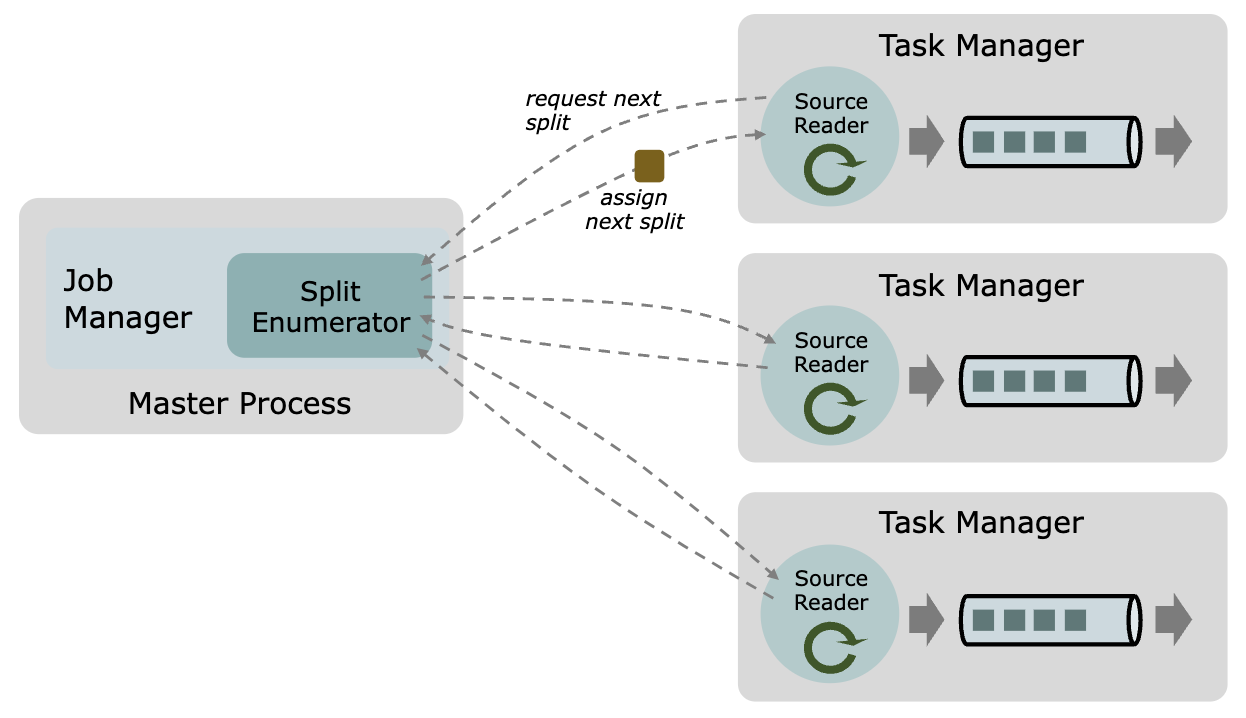
Initially, the relationship between splits and tasks might not be immediately clear. To clarify, a task is the work to be done, while a split is an object containing the position, criteria, and policies for reading data from external systems. In other words, a split is an object that provides the source operator with the necessary information to read data from external systems. The source operator is one of the operations within a task.
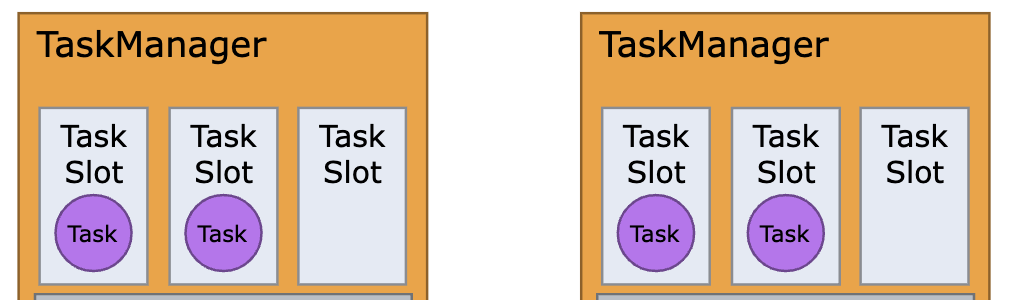
In addition, a TaskManager includes a module called a task slot, which is the entity that actually performs tasks. A TaskManager can execute multiple tasks simultaneously depending on the number of task slots it holds. The official documentation recommends assigning task slots equal to the number of CPU cores when starting a TaskManager. Therefore, considering a task slot as a single process for executing tasks will suffice for understanding this article.
Checkpoint of Apache Flink
Another key feature of Apache Flink is checkpoints. Checkpoint is a function that periodically saves the state of a flink job to a user-defined storage. The state includes information from external systems where data is being read.
For instance, when reading data from Apache Kafka, information such as the kafka topic, topic partition, and offset are stored in the checkpoint as shown in the example below. If a flink job fails, the JobManager automatically attempts to recover the job using the last successfully created and saved checkpoint. This feature also applies to Flink CDC, enabling stable recovery and operation even during issues by storing last read position.
// Actual state information is stored as binary and can be decoded using the flink-state-processor-api library as follows
topic=flink-kafka-state-test-topic, partition=0, startingOffset=50393519, stoppingOffset=Optional.empty
topic=flink-kafka-state-test-topic, partition=1, startingOffset=50416351, stoppingOffset=Optional.empty
topic=flink-kafka-state-test-topic, partition=2, startingOffset=50405380, stoppingOffset=Optional.empty
topic=flink-kafka-state-test-topic, partition=3, startingOffset=50419730, stoppingOffset=Optional.empty
Example 1: Checkpoints when consuming a kafka topic with 4 partitions
CDC, and Flink CDC
Change Data Capture (CDC) is a design pattern in software that tracks and reflects changes in data in real-time. In simple terms, it refers to the process of updating a target system in real-time with the data and changes occurring in a source system. As mentioned earlier, our team’s mission is to extract daily metrics by acquiring data from service teams. To minimize the load on production databases during this process, we need to perform CDC synchronization between the production databases with our team’s database. Flink CDC is a library that enables CDC capabilities within Apache Flink, supporting source connectors for various types of databases.
Snapshot, Binlog Stream, and GTIDs
There are several terms and concepts necessary for understanding CDC.
First, CDC involves two stages: the snapshot stage, which involves dumping or copying a database’s table to the target system for the first time, and the binlog stream stage, which involves reading binary logs of the database in real-time and updating the target system with the changes. Initially, the snapshot stage retrieves all the data, and then the binlog stream is performed to maintain CDC synchronization by reading binary logs in real-time and updating the target system.
Second, there is Global Transaction Identifiers (GTIDs), which consist of a unique identifier for the database server (UUID) and the transaction ID or range. In high availability (HA) environments where databases are set up with multiple servers, such as in primary-secondary configurations, multiple UUIDs may exist in GTIDs, and they are separated by commas. A GTIDs points to a specific position in the source database’s binary logs. From the target system’s perspective, a GTIDs indicate up to where the binary logs from the source database have been read. So this information is crucial for overall operations and recovery.
// Single UUID. UUID:transaction_id_range
b1fida2c9-2710-11ec-affa-b4lefh87156:1-2173497272

// Multiple UUID. UUID-A:transaction_id_range-A,UUID-B:transaction_id_range-B,UUID-C:transaction_id_range-C
3bxf2xbb-2fc8-11eb-855f-fax8f741gxe3:1-128377129,3c3xd21b-c931-11ed-b0db-b4xxab9ddx9e:1-273703345,901d637c-8add-11eb-8e3f-b4xdf10gxa6:1-3577694930,b46xdx51-5254-11ed-a648-d0x705ff8x48:1-1069556331
Example 2: GTIDs
Debezium and Flink CDC
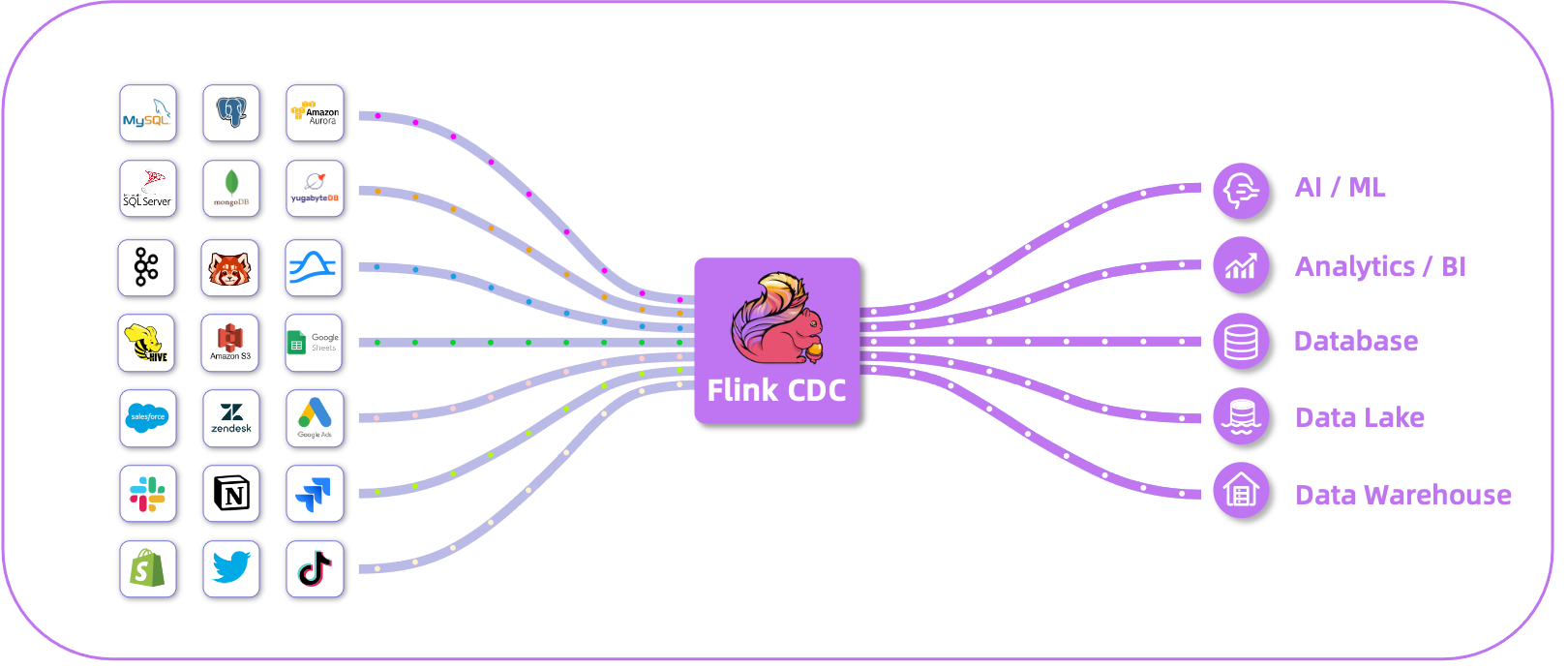
Debezium is the foundational framework for CDC, and many CDC libraries and frameworks are built upon it. It supports an incremental snapshot feature that allows tables to be divided into chunks, facilitating their seamless fetching. This makes it possible to perform both the snapshot and binlog stream stages within a single system, ensuring real-time changes on the target system.
The most common approach to perform CDC with Debezium is by pairing its sink and source connectors with Kafka Connect. For instance, to retrieve data from a MySQL database, we can use Debezium’s JDBC sink and source connectors along with Kafka Connect to easily synchronize the MySQL database via CDC. At first glance, it may seem that using the Debezium and Kafka Connect together in a production environment is problem-free, and it may seem like we don’t need Flink CDC. However, this approach has distinct disadvantages.
For instance, large MySQL tables may contain tens to hundreds of millions of records. In these settings, depending on application optimization and the size of the table records, fetching more than ten thousand records per second can be challenging. Retrieving the entire records from a table during the snapshot stage can take anywhere from half a day to several days. Given that the default retention period for binary logs is 3 days, this approach becomes impractical for real-world workloads.
Although Debezium enabled the unification of snapshot and binlog stream stages into a single system, performance and time issues make it common practice to use separate tools, like the mysqldump command or systems like Apache Spark, during the snapshot stage. After completing the snapshot stage with these external tools, changes are typically applied to the target system in real-time by the source / sink connector of Kafka Connect based on the returned GTIDs. While this approach significantly reduces the time required for the snapshot stage, it comes with the drawback of requiring separate systems for each stage.
Flink CDC can mitigate the performance issues and the need for different systems in the snapshot and binlog stream stages seen in traditional methods. As a distributed processing framework built on Debezium, Apache Flink supports incremental snapshots, dividing tables into chunks and allowing multiple processes to concurrently retrieve these chunks. This maximizes performance according to the degree of parallelism while managing the load on the source database effectively. Additionally, due to checkpointing, unlike Spark, it allows resuming from the last checkpoint instead of restarting the entire snapshot stage in case of failure.
However, Flink CDC does not provide a sink connector, so after loading the data and changes into Apache Flink, you must still integrate Kafka Connect with an additional sink connector to load data into the target system. Nonetheless, centralizing data retrieval with Flink CDC reduces management complexity and takes advantage of checkpointing. For instance, when extracting metrics involves retrieving data from tables containing identifying information, data must be hashed or masked to protect privacy. If different systems are used at each stage, hashing logic would need to be implemented individually for each system. With Flink CDC, all processing can be handled within a single system by adding the logic solely to the flink job.
Exploring flink-connector-mysql-cdc
Flink CDC is an open-source project initiated by Alibaba and Ververica. Starting from version 2.0, it switched to the Apache License, and as of version 3.1, it became a subproject of Apache Flink. It provides source connectors for various databases, including MySQL, PostgreSQL, Oracle, MongoDB, and TIDB, among others.
In our team, almost all the databases that require CDC for metric extraction are MySQL, leading us to use the MySQL source connector library from Flink CDC, specifically the flink-connector-mysql-cdc library. Now, we’ll explain the code implementation and CDC process using the flink-connector-mysql-cdc library, following each stage of the actual work.
Check MySQL Accounts and Settings
Before you begin CDC, the first requirement is having the right database account and permissions. The necessary permissions can be granted by executing the command below. To explain each permission in detail, SELECT permission is needed to fetch data at the snapshot stage. SHOW DATABASES permission is necessary to query existing databases and tables, and both REPLICATION SLAVE and REPLICATION CLIENT permissions are required to access binary logs via MySQL’s replication protocol.
GRANT SELECT, SHOW DATABASES, REPLICATION SLAVE, REPLICATION CLIENT ON *.* TO 'user' IDENTIFIED BY 'password'
Example 3: SQL to grant necessary permissions to an account
Once the account is created and permissions are granted, we can use the flink-connector-mysql-cdc library’s APIs to access the database. Before proceeding with CDC, it’s important to check and set some options in MySQL. Setting these values correctly is important to ensure a smooth CDC later. Below is a list of the options you need to verify, along with their meanings:
- binlog_format : Specifies the format of the binary logs. It should be set to
ROW, as the logs need to be stored in binary form.
private void checkBinlogFormat(JdbcConnection connection) throws SQLException {
   String mode = connection.queryAndMap("SHOW GLOBAL VARIABLES LIKE 'binlog_format'", rs -> rs.next() ? rs.getString(2) : "").toUpperCase();
   if (!BINLOG_FORMAT_ROW.equals(mode)) {...}
}
Function 1: check the binlog\format option
- binlog_row_image : Determines how the row images are stored in the binary logs. It should be set to
FULL, as all column information and values should be stored in binary logs.
private void checkBinlogRowImage(JdbcConnection connection) throws SQLException {
   String rowImage = connection.queryAndMap("SHOW GLOBAL VARIABLES LIKE 'binlog_row_image'", rs -> {
                             if (rs.next()) { return rs.getString(2); }
                             return BINLOG_FORMAT_IMAGE_FULL;
                           }).toUpperCase();
   if (!rowImage.equals(BINLOG_FORMAT_IMAGE_FULL)) {...}
}
Function 2: check the binlog\row\image option
- binlog_row_value_options: Specifies whether only the changed parts of JSON-related columns should be stored in the binary logs. It should be set to empty, indicating that all values must be stored.
private void checkBinlogRowValueOptions(JdbcConnection connection) throws SQLException {
   String rowValueOptions = connection.queryAndMap("SHOW GLOBAL VARIABLES LIKE 'binlog_row_value_options'", rs -> rs.next() ? rs.getString(2) : DEFAULT_BINLOG_ROW_VALUE_OPTIONS).trim().toUpperCase();
   if (!DEFAULT_BINLOG_ROW_VALUE_OPTIONS.equals(rowValueOptions)) {...}
}
Function 3: check the binlog_row_value_options option
Identify Target Databases and Tables
If there are no issues with the MySQL database options, the next step is to query the databases and tables. By querying all databases and tables, we can filter them based on the names of the target databases and tables specified by the user. To perform this task, the database account must have the SHOW DATABASES permission. By checking logs, you can see which databases and tables were queried and which ones were selected for CDC.
public static List listTables(...) {
   final List capturedTableIds = new ArrayList<>();
   final List databaseNames = new ArrayList<>();

   ...

   jdbc.query("SHOW DATABASES",  rs -> {
               while (rs.next()) {
                   String databaseName = rs.getString(1);
                   if (tableFilters.databaseFilter().test(databaseName)) {
                       databaseNames.add(databaseName);
                   }
               }
           });
    for (String dbName : databaseNames) {
       try {
           jdbc.query("SHOW FULL TABLES IN " + StatementUtils.quote(dbName) + " where Table_Type = 'BASE TABLE'",  rs -> {
                       while (rs.next()) {
                           TableId tableId = new TableId(dbName, null, rs.getString(1));
                           if (tableFilters.dataCollectionFilter().isIncluded(tableId)) {
                               capturedTableIds.add(tableId);
                           } else {...}
                       }
                   });
       } catch (SQLException e) {...}
   }
   return capturedTableIds;
}
Function 4: identify target databases and tables
INFO org.apache.flink.cdc.connectors.mysql.source.utils.TableDiscoveryUtils [] - Read list of available databases
INFO org.apache.flink.cdc.connectors.mysql.source.utils.TableDiscoveryUtils [] - list of available databases is: [config_generator_test, database_name, information_schema, mysql, performance_schema, sys, test]
INFO org.apache.flink.cdc.connectors.mysql.source.utils.TableDiscoveryUtils [] - Read list of available tables in each database
INFO org.apache.flink.cdc.connectors.mysql.source.utils.TableDiscoveryUtils [] - 'mysql.columns_priv' is filtered out of capturing
...
INFO org.apache.flink.cdc.connectors.mysql.source.utils.TableDiscoveryUtils [] - 'performance_schema.accounts' is filtered out of capturing
...
INFO org.apache.flink.cdc.connectors.mysql.source.utils.TableDiscoveryUtils [] - including 'database1.table1' for further processing
Examples 4: captured table1 of database1 in the log
Snapshot Stage
Once databases and tables have been captured, the first stage of CDC, the snapshot stage, begins. Flink CDC inherently supports incremental snapshots, which makes it necessary to first calculate the chunk size for record retrieval. This involves calculating a distribution factor to determine the distribution of values in the user-specified chunk key column, which influences the chunk size. The distribution factor is calculated as (max(id) - min(id) + 1) / # record, and the actual chunk size is the product of the user-defined chunk size and this distribution factor.
For example, if the distribution factor is calculated to be 2, this indicates that the range of the chunk key column (maximum value - minimum value) is twice the number of records. If the user-defined chunk size is initially set to 8,096, multiplying it by the distribution factor of 2 results in an actual chunk size of 16,192.
private int getDynamicChunkSize(
       TableId tableId,
       Column splitColumn,
       Object min,
       Object max,
       int chunkSize,
       long approximateRowCnt) {
   if (!isEvenlySplitColumn(splitColumn)) {
       return -1;
   }
   final double distributionFactorUpper = sourceConfig.getDistributionFactorUpper();
   final double distributionFactorLower = sourceConfig.getDistributionFactorLower();
   double distributionFactor =
           calculateDistributionFactor(tableId, min, max, approximateRowCnt);
   boolean dataIsEvenlyDistributed =
           ObjectUtils.doubleCompare(distributionFactor, distributionFactorLower) >= 0
                   && ObjectUtils.doubleCompare(distributionFactor, distributionFactorUpper)
                           <= 0;
   if (dataIsEvenlyDistributed) {
       // the minimum dynamic chunk size is at least 1
       return Math.max((int) (distributionFactor * chunkSize), 1);
   }
   return -1;
}
Function 5: calculate chunk size
Below is an example of snapshot splits generated with a chunk size of 16,192 based on the chunk key column, id. In Flink CDC, splits are defined for both the snapshot and binlog stream stages. Snapshot splits include the database name, table name, chunk key, and chunk range information, which TaskManagers use to retrieve data from MySQL. Because the JobManager calculates snapshot splits and TaskManagers retrieve records asynchronously, these tasks are performed simultaneously.
splitId='database1.table1:split_number1', splitKeyType=[`id` INT NOT NULL], splitStart=[0], splitEnd=[16192]
splitId='database1.table1:split_number2', splitKeyType=[`id` INT NOT NULL], splitStart=[16192], splitEnd=[32384]
...
Example 5: snapshot splits
If the calculated distribution factor is less than 0.05 or greater than 1,000, the chunk key column is considered unevenly distributed. In such cases, the queries below are applied sequentially to split the chunk ranges. Unlike the previously explained approach, this method does not simply divide the ranges based on a chunk size to generate snapshot splits.
- Set a LIMIT for the query equal to the chunk size
- Execute the query
- Use the result of the query to define the range for the next query**,** then repeat from step 1
This process is synchronous, as it relies on the result from previous query to produce subsequent ones. Consequently, it can be time-consuming, preventing full utilization of Apache Flink’s parallel processing capabilities and negatively impacting overall execution time. The official documentation also notes that such an approach is inefficient, emphasizing the importance of selecting an appropriate and evenly distributed chunk key column. As stated in the documentation, “unevenly-sized chunks will request many queries and are not efficient.”
// Use user-defined chunk size 8096 as a limit
Query  SELECT MAX(`id`) FROM (SELECT `id` FROM `database1`.`table1` WHERE `id` >= 0 ORDER BY `id` ASC LIMIT 8096) AS T
// Assume the query result is 18710008400
Query  SELECT MAX(`id`) FROM (SELECT `id` FROM `database1`.`table1` WHERE `id` >= 18710008400 ORDER BY `id` ASC LIMIT 8096) AS T
// Assume the above query result is 3849871000
Query  SELECT MAX(`id`) FROM (SELECT `id` FROM `database1`.`table1` WHERE `id` >= 38049871000 ORDER BY `id` ASC LIMIT 8096) AS T
...
Example 6: calculate chunk ranges for unevenly distributed chunk key column
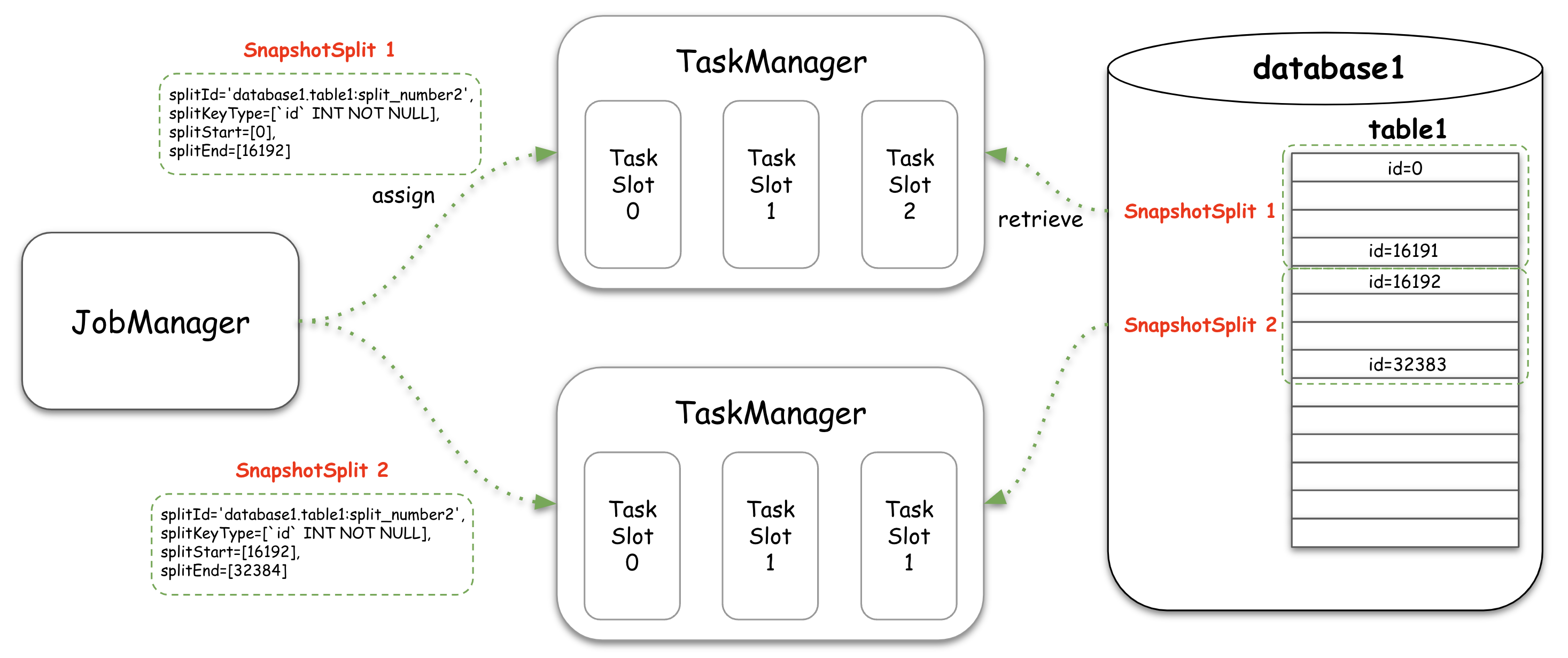
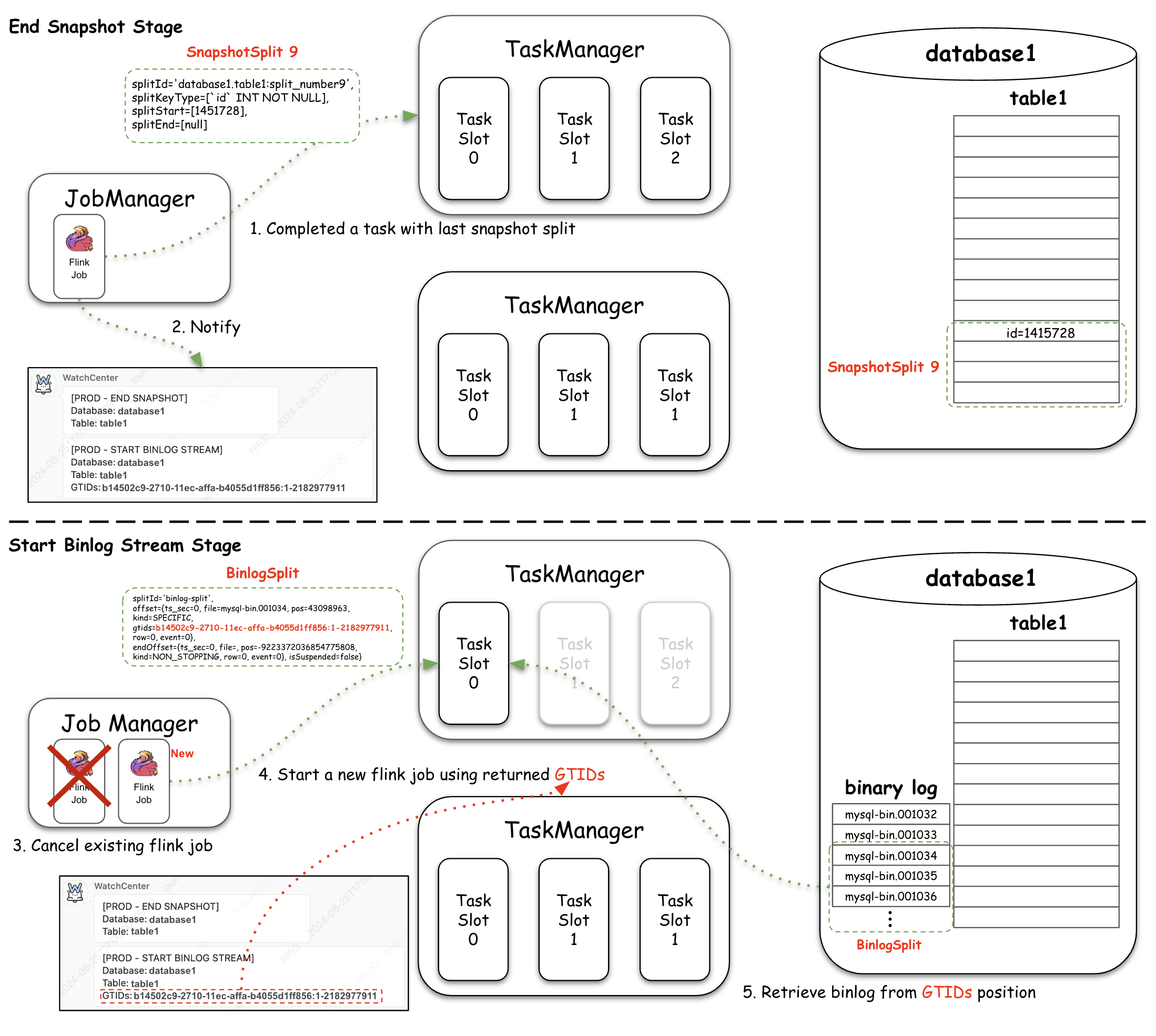
As shown in the figure above, TaskManagers retrieve records based on the assigned snapshot split. After successfully loading the record into the target system, it informs the JobManager that the snapshot split has been completed. The snapshot stage concludes when all snapshot splits have been completed. However, if the parallelism of the flink job is set to 2 or more, an additional checkpoint is conducted to synchronize the state between subtasks before the snapshot stage is finalized.
private boolean allSnapshotSplitsFinished() {
   return noMoreSnapshotSplits() && assignedSplits.size() == splitFinishedOffsets.size();
}
Function 6: verify completion of snapshot stage
Binlog Stream Stage
After the snapshot stage is complete, the next step is to read the binary logs from the MySQL database. These logs capture events such as table creations, data insertions, and modification in the database. At this point, CDC is considered nearly complete.
As explained during the snapshot stage, the flink-connector-mysql-cdc defines and uses snapshot splits for processing. Similarly, in the binlog stream stage, it defines and uses binlog splits. Once the snapshot stage is complete, binlog splits, a position that the binlog stream has started, are logged. These logged binlog splits contain GTIDs that identify the starting position of the binary log that needs to be read. Therefore, after the snapshot stage, CDC is finalized by reading the binary logs based on the GTIDs present in the binlog splits.
The enumerator assigns split MySqlBinlogSplit{splitId='binlog-split',
	offset={ts_sec=0, file=mysql-bin.000001, pos=12345678, kind=SPECIFIC, gtids=b1bda2c9-x12x-11ec-affa-f124x97g14xg0:1-9999, row=0, event=0},
	endOffset={ts_sec=0, file=, pos=-9223372036854775808, kind=NON_STOPPING, row=0, event=0}, isSuspended=false} to subtask 0
Example 7: binlog split in logs
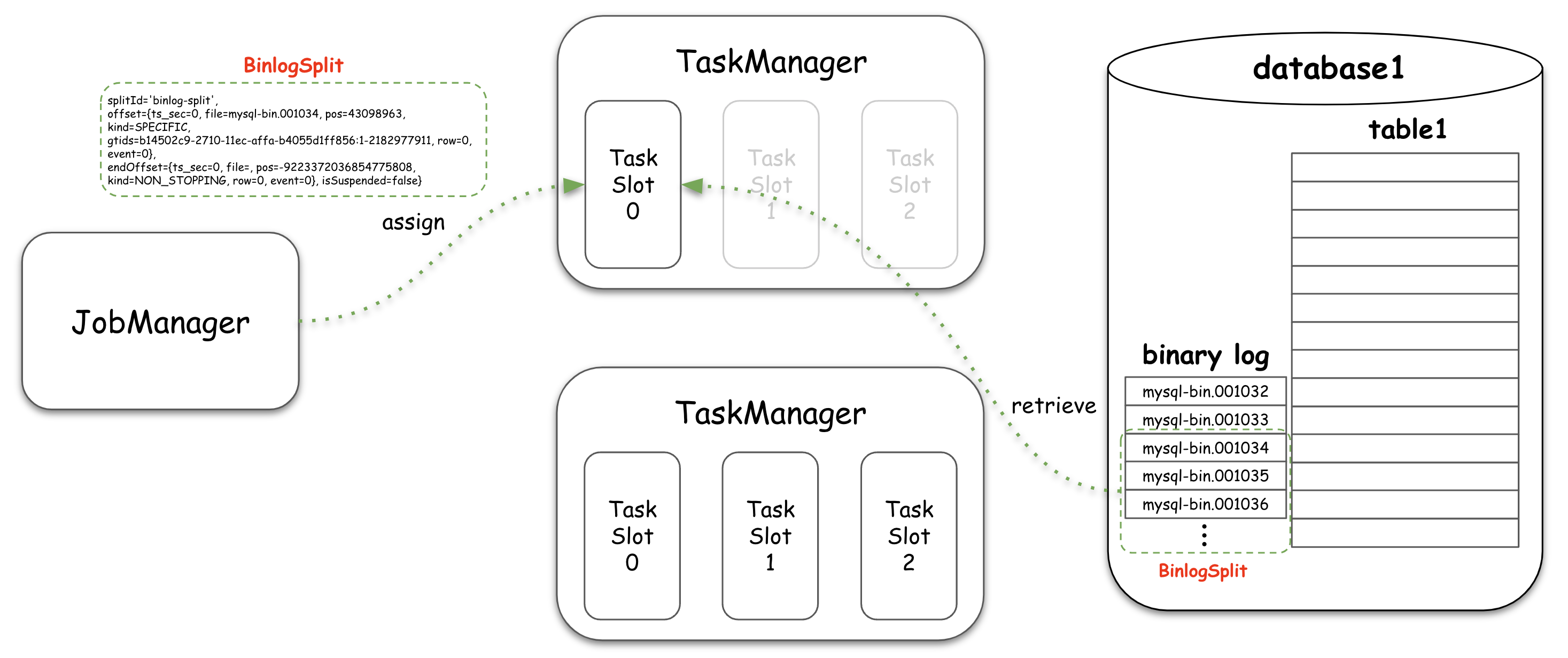
This may raise a question. In the binlog stream stage, we mentioned that reading begins from the binary log indicated by the GTIDs. In further examining the logs, it becomes clear that, regardless of how quickly Apache Flink completes the snapshot stage, binary logs will inevitably be generated during this snapshot stage. These binary logs will capture changes during the snapshot stage. Without proper handling, this could lead to data loss or consistency issues.
To address this, the flink-connector-mysql-cdc stores the GTIDs of the first chunk it fetches in memory. This chunk could either be the 0th snapshot split or any other snapshot split, as multiple task slots run simultaneously. The JobManager identifies the lowest GTIDs from the GTIDs obtained from completed snapshot splits and uses this to start the binlog stream. Therefore, if the snapshot stage took one hour, the binlog stream stage starts based on GTIDs pointing to binary logs from 1 hour ago.
Customizing flink-connector-mysql-cdc
In theory, if everything works as described above, we should be able to complete CDC with good performance. However, there are a few limitations, particularly concerning Apache Flink’s resource management.
First, you cannot adjust the parallelism of an already running flink job. Also, in the binlog stream stage, maintaining the order of events is crucial. For instance, if a value in the source table is changed from A to B, the target system must apply these changes in the same order. If the order is not preserved, the target system and the source database state will diverge. To ensure this order, the flink-connector-mysql-cdc is designed such that only the 0th subtask reads the binary log.
If you set the parallelism of a flink job to 20 during the snapshot stage for better performance, when transitioning to the binlog stream stage, only one subtask (the 0th) will read the binary log, while the other 19 subtasks remain idle, wasting resources. Apache Flink version 1.18 introduced a feature to dynamically adjust parallelism to address this issue, but our team was using version 1.17, so we couldn’t utilize that feature.
To solve these problems and improve operational convenience, we’ve added and modified several features in the flink-connector-mysql-cdc library, which I’ll now introduce one by one.
Notify Stage Change with Some Information
Flink CDC consists of two stages: snapshot and binlog stream. Our team uses Flink CDC to send table records and binary logs to Kafka topics, with different topics being used for each stage.
Initially, in the snapshot stage, the entire table record is retrieved, so we set the number of Kafka topic partitions in proportion to the table size to minimize the load on the Kafka cluster. In contrast, during the binlog stream stage, as previously mentioned, the number of Kafka partitions must be fixed at on to ensure event order. Therefore, different Kafka topics tailored to each stage’s purpose should be used for the snapshot and binlog stream stages.
A complicating factor is that Kafka topics cannot be dynamically changed for an already running flink job, and stage changes can only be confirmed through logs. To address this, we needed the following capabilities:
- An easy way to verify the transition from the snapshot stage to the binlog stream stage.
- The ability to restart flink jobs using the GTIDs present in the binlog split and the Kafka topic designated for the binlog stream.
To accomplish this, we added notifications at the beginning of each stage, and when the binlog stream stage begins, the GTIDs included in the binlog split are sent to our in-house notification system, Watchtower. Below are the functions in flink-connector-mysql-cdc that check for the completion of the snapshot stage. These functions are divided into two because, when the parallelism is 2 or more, an additional checkpoint is awaited to synchronize the subtask’s states. By adding a function to signal the completion of the snapshot stage, it became easy to confirm the transition to the binlog stream stage. Therefore, after the snapshot stage ends, we can stop the flink job and start the binlog stream stage using the Kafka topic and GTIDs provided via the notification.
public void onFinishedSplits(Map splitFinishedOffsets) {
   ...
   if (allSnapshotSplitsFinished() && isAssigningSnapshotSplits(assignerStatus)) {
       if (currentParallelism == 1) {
	  ...
           NotificationUtils.notifyPhaseSwitch("END SNAPSHOT", ...);
       }
   ...
   }
}

public void notifyCheckpointComplete(long checkpointId) {
   ...
   if (checkpointIdToFinish != null && isAssigningSnapshotSplits(assignerStatus) && allSnapshotSplitsFinished()) {
       if (checkpointId >= checkpointIdToFinish) {
	 ...
          NotificationUtils.notifyPhaseSwitch("END SNAPSHOT", ...);
       }
       ...
   }
}
Modified Function 1: notify snapshot stage completion
private void assignSplits() {
   ...
   while (awaitingReader.hasNext()) {
       ...
       Optional split = splitAssigner.getNext();
       if (split.isPresent()) {
			...
           if (mySqlSplit instanceof MySqlBinlogSplit) {
               ...
				NotificationUtils.notifyPhaseSwitch("START BINLOG STREAM", this.sourceConfig.getTableList().get(0), position);
           }
       }
       ...
   }
Modified Function 2: notify binlog stream stage start with GTIDs
Skip DDL Event and Subsequent Events
Our team performs CDC with databases from other service teams. However, some service team’s tables often contain identifiable information, which can present privacy issues. To address this, sensitive data undergoes hashing or masking during retrieval before being stored in our databases. Even with this work, if the schema of a service team’s table that is synchronized with CDC changes (e.g., ADD COLUMN phone_number varcher(31)), there is a risk that sensitive data could be retrieved and stored without hashing or masking in our team’s database, leading to significant issues. To prevent this, our team detects a DDL event, ensures that applying this DDL event to our table will not cause any issues, and then applies and re-synchronized with CDC using GTIDs of the DDL event.
We then need to decide how to handle DDL event processing. Ensuring that a message is sent exactly once to a Kafka topic when a DDL event occurs is critical. We use the exactly once configuration provided by the flink-connector-kafka library to maintain message consistency and reliability during DDL events.
At first, we considered stopping the flink job by throwing a FlinkRuntimeException when a DDL event occurs. However, this approach doesn’t guarantee that messages generated just before the DDL event are sent to the Kafka topic. Under the exactly once configuration, Apache Flink performs checkpoints and commits messages to Kafka to ensure they have been safely sent. If the flink job stops, no commit to Kafka occurs, and there is no guarantee that messages have been delivered.
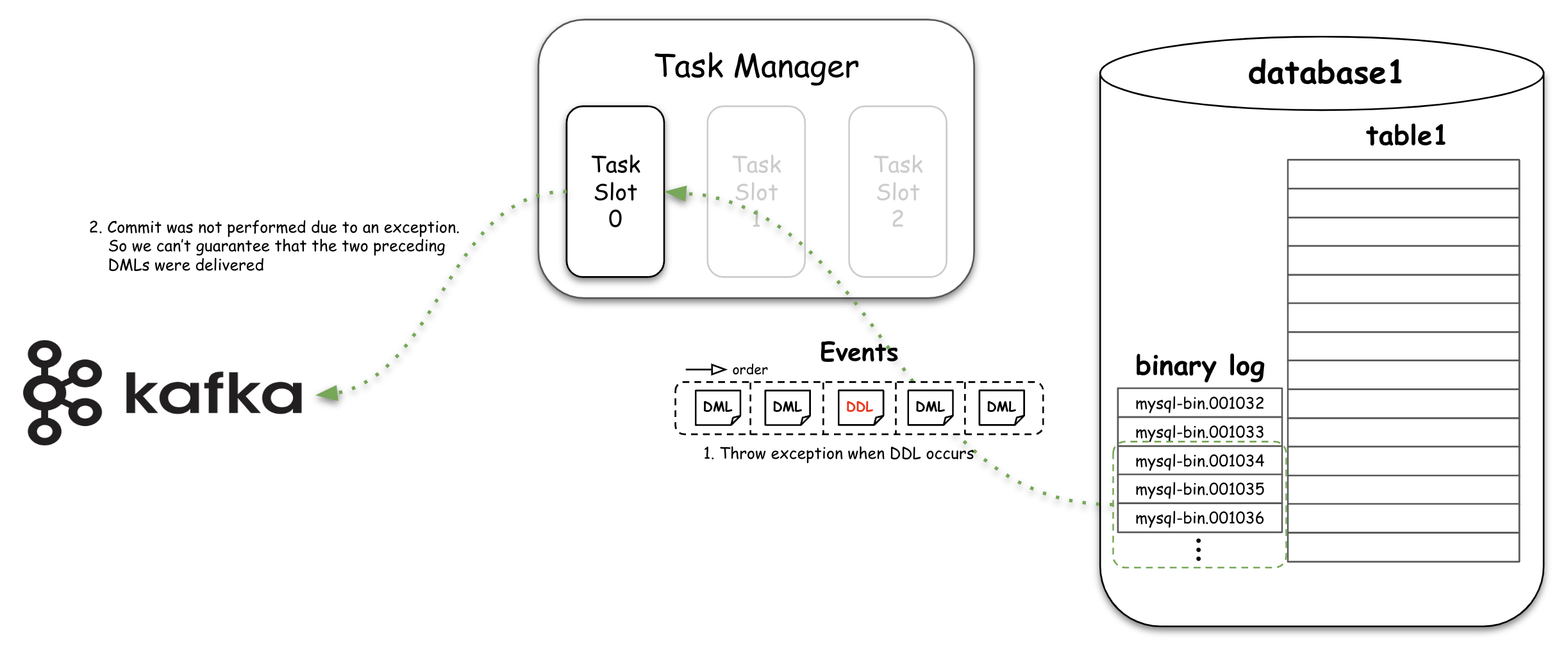
The second approach we considered was skipping the DDL event and subsequent events. For this scenario, we modified the logic to ensure that no actions are performed on the DDL event and subsequent events, if the flink job detects a DDL event. With this modification, message transmission and commits are completed for events occurring just before a DDL event, while neither the DDL event nor its subsequent events are reflected in the target system.
However, using this approach requires the GTIDs of the DDL event. This information is essential to apply the DDL to the target system and restart the binlog stream using these GTIDs to complete re-synchronization with CDC. So we modified functions to send details of the DDL and its GTIDs to our in-house notification system. This allows us to acknowledge and verify the event before proceeding with re-synchronization.
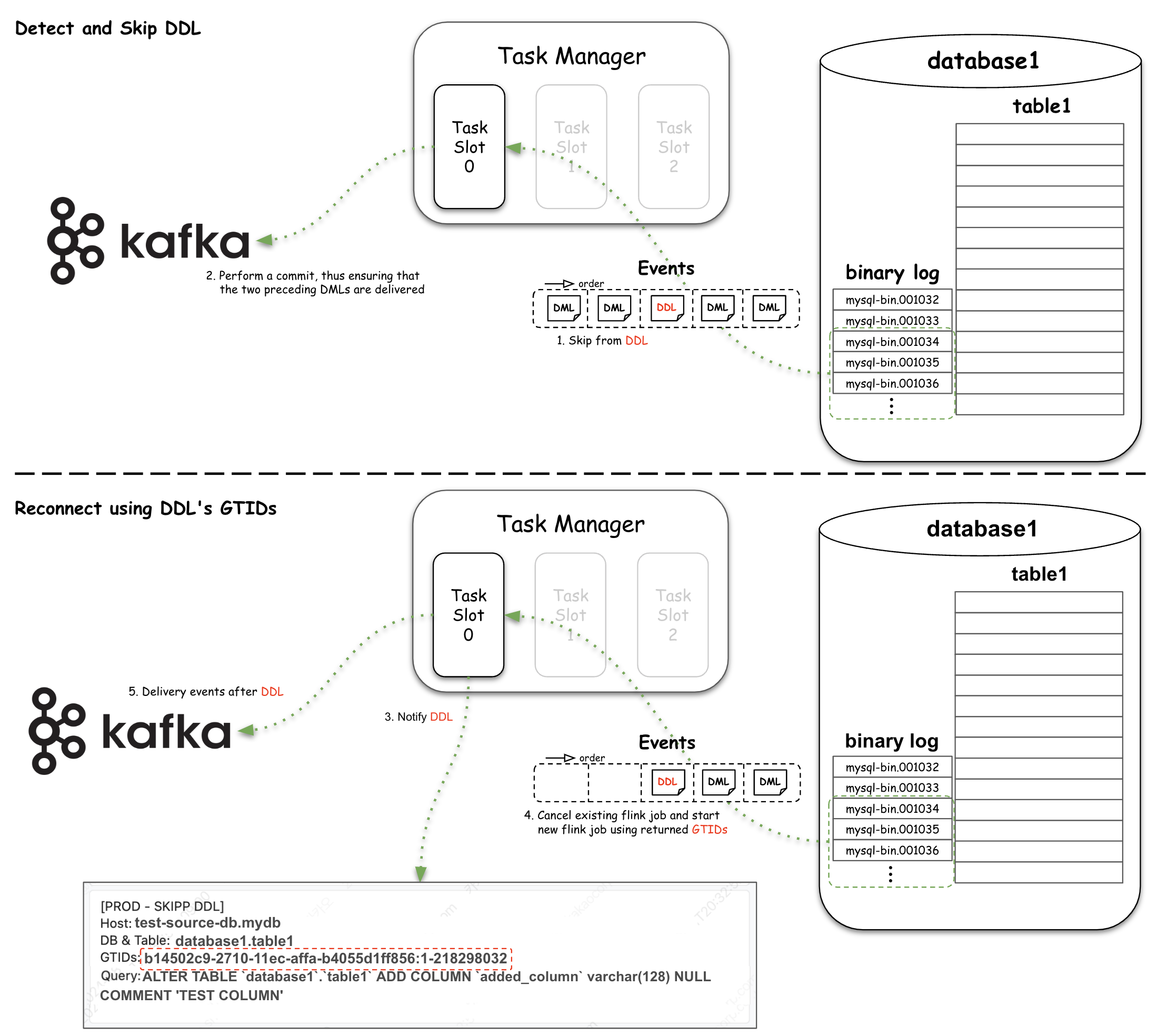
Below is the modified handleQueryEvent function in flink-connector-mysql-cdc. It reads the binary logs, categorizes event types, and responds accordingly. In this logic, when a SchemaChangeEvent, i.e., a DDL event, is detected, it skips the DDL event and all subsequent messages.
protected void handleQueryEvent(...) throws InterruptedException {
   QueryEventData command = unwrapData(event);
   String sql = command.getSql().trim();
    if (sql.equalsIgnoreCase("BEGIN")) {
       if (doesDdlPassed) { // Skip events occurring after DDL event
           return;
       }
   ...
   }
   if (sql.equalsIgnoreCase("COMMIT")) {
       if (doesDdlPassed) { // Skip events occurring after DDL events
           return;
       }
   ...
   }
   ...
   final List schemaChangeEvents =  taskContext.getSchema().parseStreamingDdl(...)
   try {
       for (SchemaChangeEvent schemaChangeEvent : schemaChangeEvents) {
           if (taskContext.getSchema().skipSchemaChangeEvent(schemaChangeEvent)) {
               continue;
           }
            final TableId tableId = schemaChangeEvent.getTables().isEmpty() ? null : schemaChangeEvent.getTables().iterator().next().id();
            if (this.handleQueryAndCheckIfSkipNeeded(tableId, offsetContext, event, sql, true)) { // Notify and skips DDL event and Subsequent events
               return;
           }
            ...
       }
   }
   ...
}
Modified Function 3: skip DDL and subsequent events
Handle Database Switching
During the CDC, we connect to the database using the MySQL secondary server domain. However, if a database switch occurs, the primary and secondary database change, potentially connecting to the primary database of the production service. Although the replication protocol doesn’t execute actual queries and doesn’t impose load on the database, connecting to the primary server of the service database is not recommended. Therefore, it’s essential to periodically verify whether our flink job is connected to the primary server.
Detecting whether connected to the primary database depends on the configuration of the MySQL database server. Our current detection logic targets the following two scenarios:
- Two servers are configured in a primary-replica setup.
- More than two servers are grouped in an InnoDB Cluster.
For each situation, we’ve added specific detection logic to the library. Instead of adding a separate monitoring job, which becomes hard to manage as the number of databases and tables grows, we automate the process of stopping the flink job and re-connecting to the secondary server domain when a switch is detected.
In the case of two servers configured in a primary-secondary setup, we periodically query the DNS server for the IP address based on the provided secondary server domain. If a change in IP is detected, an exception is thrown in the flink job, along with a message that the IP address has changed. Following this, the flink job will be restarted according to the restart policy set in Flink, re-connecting to the database using the secondary server domain. Note that the DNS cache in the flink job must be disabled to facilitate this process.
public class DNSIpChecker {
	...
   private int checkIntervalMs = 1000;
   private int logInterval = 60 * checkIntervalMs / 1000;
   private ExecutorService executorService;

   private void execute() throws Exception {
       String currentIpInDNS = "";
       Integer checkCnt = 0;
       while (this.currentTaskRunning) {
           ...
           currentIpInDNS = this.getIp(); // 1. Retrieve IP address from DNS
           if (!currentIpInDNS.equals(this.initIp)) { // 2. Throw exception if IP address has changed
               ...
               NotificationUtils.notifyIPChanged(...); // 3. Notify IP address changed
               throw new FlinkRuntimeException("CONNECTED TO PRIMARY (IP address has changed)");
           }
           Thread.sleep(checkIntervalMs);
       }
   }

   private String getIp() {
       String ipInDNS = "";
       try {
           ipInDNS = InetAddress.getByName(this.fqdn).getHostAddress();
       }
       ...
       return ipInDNS;
   }

   public void close() {
      ...
      this.executorService.shutdownNow(); // 4. Shutdown thread when MySQLSourceReader closed
      ...
   }
}
Added Function 1: periodically check IP address from DNS
For InnoDB Clusters with more than two servers, the previous approach is not applicable. The domain-based IP query could return different IPs for secondary servers each time. In our MySQL InnoDB Cluster configuration, the read\only settings differ between primary and secondary servers, being set to false for the primary and true for secondaries. By periodically querying this setting, we can determine if the connection is to the primary server. If it is, an exception is thrown in the flink job. Subsequent actions then proceed as described earlier, re-connecting based on the domain of the secondary server.
public class ReadOnlyChecker {
   ...
   private static final String GET_READONLY_SQL = "select @@global.read_only";
   private ExecutorService executorService;

   private void execute() throws Exception {
       ...
       while (this.currentTaskRunning) {
           ...
           boolean readOnly = this.getReadOnly(); // 1. check read_only option
           if (!readOnly) { // 2. If read_only set as false, throw an exception
               NotificationUtils.notifyIPChanged(...) // 3. Notify read_only option has changed
               throw new FlinkRuntimeException("CONNECTED TO PRIMARY (read_only = true)");
           }
           Thread.sleep(checkIntervalMs);
       }
       ...
   }

   private boolean getReadOnly() throws SQLException {
       boolean res = true;
       try (Statement stmt = this.conn.createStatement()) {
           ResultSet rs = stmt.executeQuery(GET_READONLY_SQL);
           if (rs.next()) {
               res = rs.getBoolean(1);
           }
           ...
       }
       return res;
   }

   public void close() {
      ...
      this.executorService.shutdownNow(); // 4. Shutdown thread  when MySqlSourceReader closed
      ...
   }
}
Added Function 2: periodically check read_only option
These added switching detection features share the lifecycle with the source reader of TaskManager as described in the code comments. However, if you set the parallelism to 2 or more for a snapshot phase, multiple threads can perform, leading to potential issues. To prevent this, the detection feature is only executed on the 0th subtask.
public class MySqlSourceReader {
   ...
   private DNSIpChecker dnsIpChecker;
   private ReadOnlyChecker readOnlyChecker;
   private List curBinlogSplit;

   @Override
   public void start() {
       ...
       this.prepareBeforeStart();
   }

   public void close() throws Exception {
       ...
       this.cleanupBeforeClose();
   }

   private boolean isFirstSubtask() { // 1. Check if it is the 0th subtask (task slot)
      return this.subtaskId == 0;
   }

   private void prepareBeforeStart() { // 2. When MySqlSourceReader starts, start thread to detect switching
       if (this.dnsIpCheckerRequired()) {
           this.dnsIpChecker = new DNSIpChecker(this.subtaskId, this.context, sourceConfig);
           this.dnsIpChecker.run();
       } else if (this.readOnlyCheckerRequired()) {
           this.readOnlyChecker = new ReadOnlyChecker(this.subtaskId, this.context, sourceConfig);
           this.readOnlyChecker.run();
       }
   }

   private void cleanupBeforeClose() { // 3. When MySqlSourceReader has closed, closed the thread for detecting switching
       ...
       if (this.dnsIpCheckerRequired()) {
           this.dnsIpChecker.close();
       }
       if (this.readOnlyCheckerRequired()) {
           this.readOnlyChecker.close();
       }
   }
   ...
}
Modified Function 4: lifecycle of switching detection module in MySqlSourceReader
Relaxing the constraint for Chunk Key Column
The subjects discussed so far involved adding necessary features into the library based on team needs or operational convenience. In this section, we propose improvements for handling more general situations. As mentioned earlier, Flink CDC supports an incremental snapshot feature that allows dividing and reading tables in chunks. There are different constraints on the columns used to partition a table into chunks: Tables with primary keys only allow using columns that are part of the primary key as chunk key columns, and using non-primary key columns results in an error. Tables without primary keys have no constraints starting from Flink CDC version 2.4.
When performing CDC with tables in various service teams, we encounter tables with diverse schemas, some of which have a varbinary type column as primary key. If a varbinary column is set as chunk key columns for the incremental snapshot feature, the chunk range calculations sometimes fail, causing the entire table data to be fetched as a single chunk. This leads to an excessive load on the source database and can cause OOM (Out of Memory) errors on theTaskManager by fetching too much data at once.
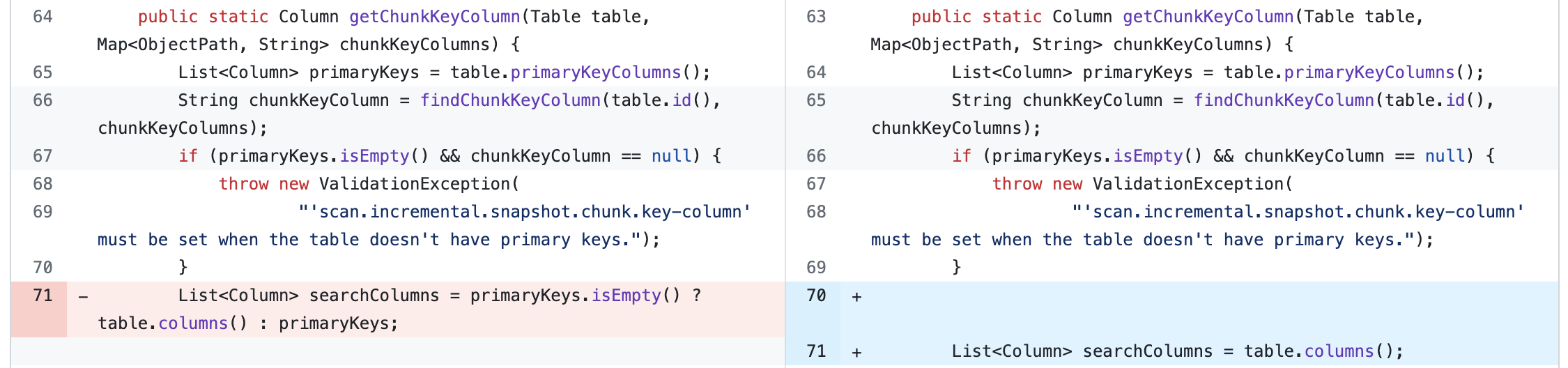
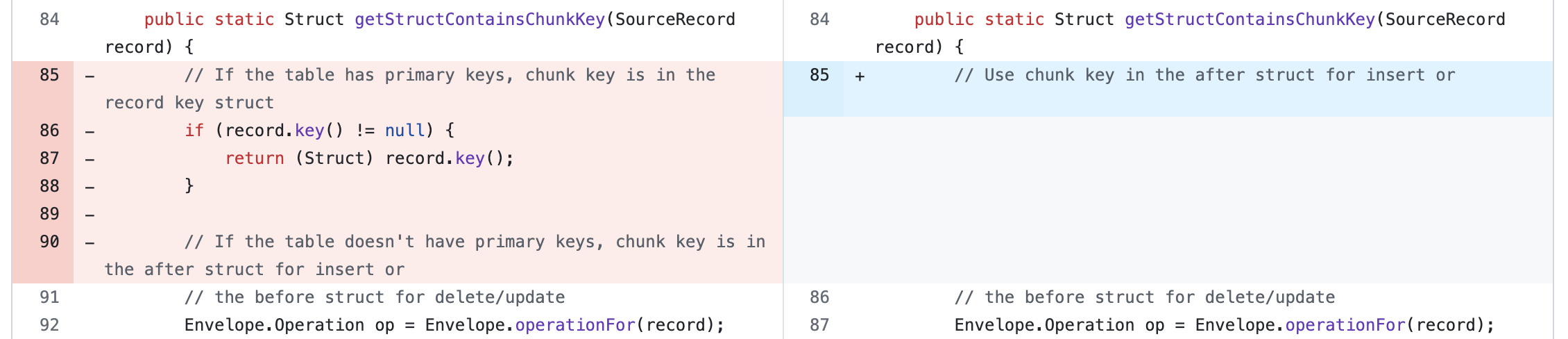
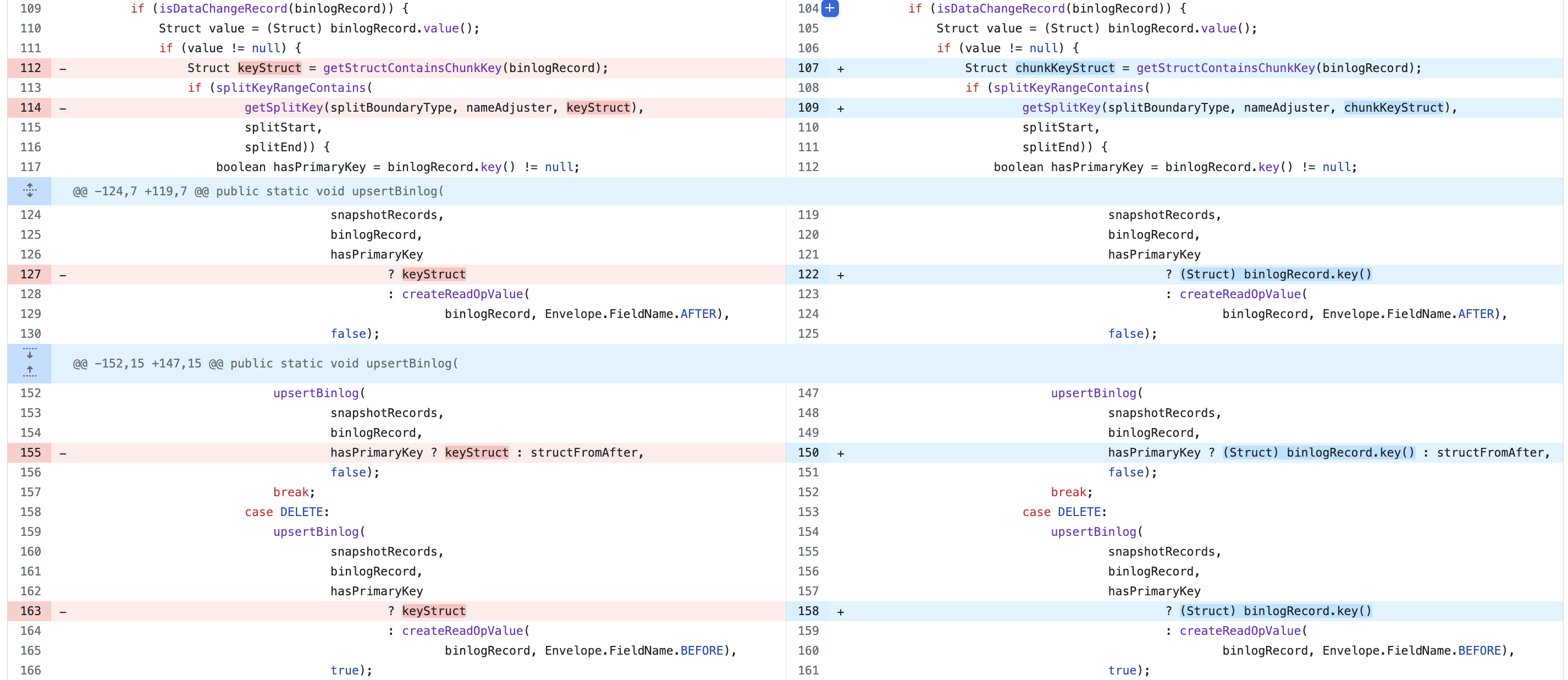
To address this, we have proposed and revised the following logic for tables with primary keys. You can check all the changes on [FLINK-35740].
-
Removed the logic that checks whether the chunk key column is part of the primary key.
-
For tables with primary keys, modify the logic so that the primary key-related object is not used directly as the chunk key.
-
Modified the logic to ensure that primary key-related objects and chunk key-related objects are not shared, and that appropriate objects are independently created and used for different contexts.
Conclusion
I would like to thank the readers who stayed with me until the end of this article, and conclude with personal reflections and useful tips for those considering using Flink CDC.
Personally, I think it was the first time I analyzed a library in such depth like this. Understanding the operation process of the library, identifying and modifying the necessary features, and proposing and implementing it was a tough but satisfying development experience. Also, to apply Flink CDC to a production service, knowledge in various fields was needed, such as MySQL, Apache Flink, Apache Kafka, and distributed frameworks like Kafka Connect. This experience made me realize that my understanding of systems, infrastructure, and platforms is still lacking, and it was a good experience in terms of work methods and collaboration perspective, through in-depth discussions with various internal teams.
A tip that I’d like to share when using Flink CDC is about the version. Apache Flink and Flink CDC versions used in this article are 1.17.1 and 2.4.1, respectively. Flink CDC’s 3.0 version was released in December 2023, and the most recent 3.1.1 version was released on June 20, 2024. From the 3.x versions, several features have been improved and added, such as performing only the snapshot stage and improving the logic for checking MySQL configurations. Also, for easier use, not only the individual source connectors are provided, but the whole pipeline from the reading task to the loading task is offered. In particular, the pipeline from MySQL to Apache Kafka is officially supported, making it easier to utilize combined with Kafka Connect. If you are considering using Flink CDC, I recommend using version 3.x or especially 3.1 or later. However, you should consider that as of August 2024, the Flink CDC 3.x version is only compatible with Apache Flink 1.18 version.
Finally, I would like to express my gratitude to our team that supported and collaborated on this work. Thank you.