Android
Compose에서 Stable을 가볍게 보면 안 되는 이유: 베드 케이스로 본 안정성의 법칙 Part 1
Jonas여기어때
2025년 9월 3일
원문에서 보기 ↗Android Compose를 사용할 때 안정성(Stability) 은 결코 가볍게 넘길 수 없는 핵심 주제입니다. 안정성이 지켜져야만 Compose가 불필요한 재구성을 건너뛰고 성능을 유지할 수 있기 때문입니다. 이를 위해 개발자가 따라야 할 몇 가지 규칙이 존재하지만, 문서나 예제만으로는 모든 함정을 미리 알기 어렵습니다.
이 글에서는 안정성 개념을 이미 기본적으로 이해하고 있는 개발자 를 대상으로 합니다. 단순 개념 설명이 아니라, 직접 겪을 수 있는 베드 케이스(잘못 사용 한 사례) 를 통해 우리가 놓치기 쉬운 부분과 Compose 내부가 어떤 메커니즘으로 반응하는지 살펴보겠습니다.
베드 케이스 실험
recomposition이 발생했을 때, 일반 class , data class , @Stable , @Immutable 을 각각 적용했을 때 어떤 결과가 나타나는지 비교했습니다.
Test version : kotlin 2.2.10, compose bom 2025.08.00
테스트는 recomposition을 강제로 발생시키는 버튼을 포함한 TestScreen으로 구성하였습니다. 버튼을 누를 때마다 count 값이 증가하여 Column 내부가 recomposition 대상이 되도록 하여 어떤 경우에 recomposition skip 되는지 알아보겠습니다.
@Composable
fun TestScreen() {
    var count by remember { mutableIntStateOf(0) }

    Column {
        Button(
            onClick = { count++ }, // count 를 증가 시켜 recomposition 발생
        ) {
            Text("count: $count")
        }
        // recomposition 대상 코드
        TestClassContent(TestClass("$count TestClass Text"))
    }
}
class + var 프로퍼티 조합
일반 class 와 가변 형태에서 테스트 결과 입니다. 테스트를 진행하는 Content 내부에는 Row 로 감싸진 Text Component 를 사용하며, TestClass 의 String를 통해 text 를 그리게 되어있습니다.
class TestClass(
    var text: String,
)

@Composable
fun TestClassContent(content: TestClass) {
    Row(modifier = Modifier.padding(10.dp)) {
        Text(text = content.text)
    }
}

val testClass by remember { mutableStateOf(TestClass("TestClass Text")) }

TestClassContent(testClass)
TestClassContent(TestClass("New TestClass Text"))
TestClassContent(TestClass("$count TestClass Text"))
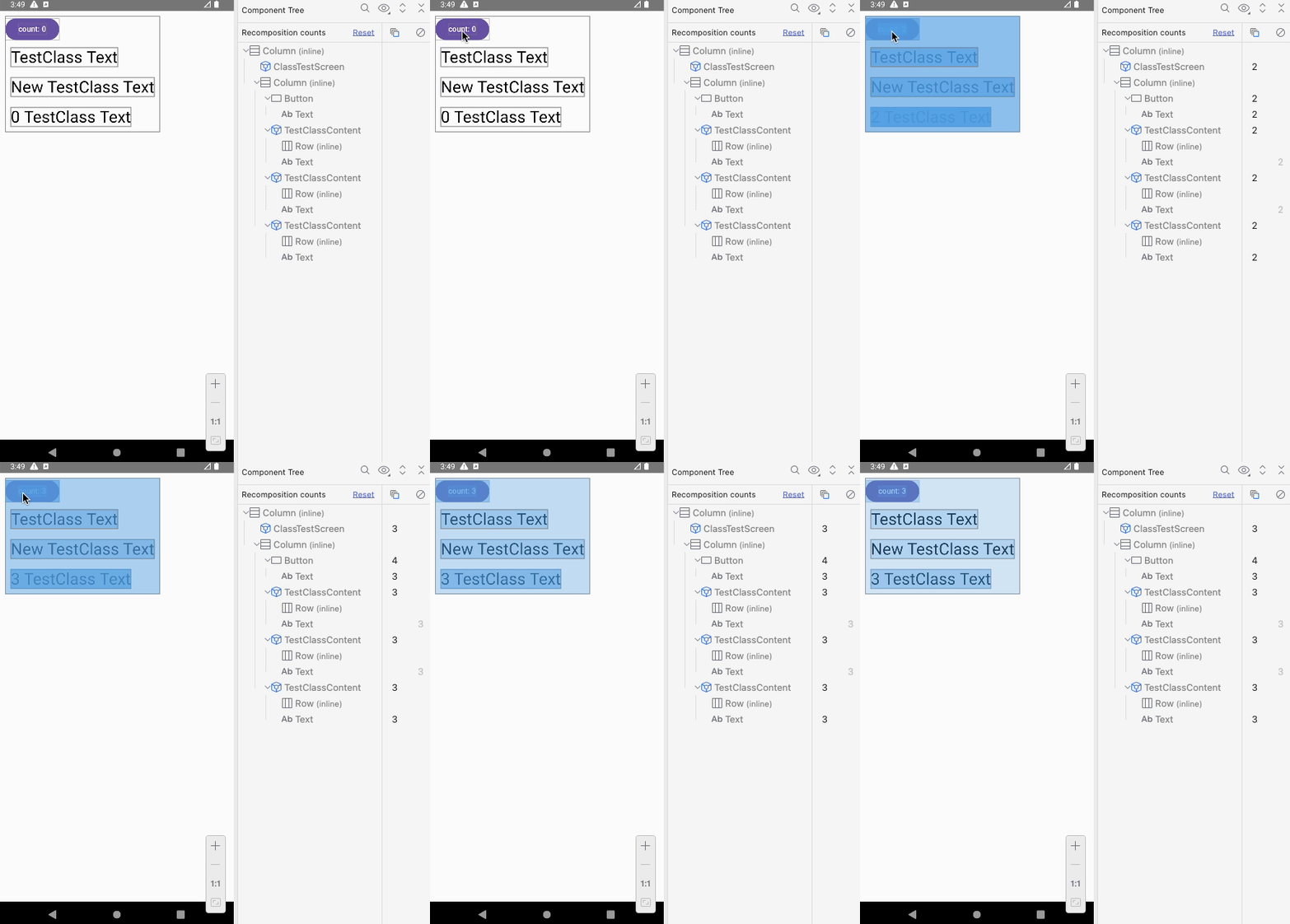
remember로 유지된 객체, 동일한 property로 생성된 새 객체, 다른 property로 생성된 객체 모두 recomposition 대상.- 단,
text값이 같은 경우에는String자체가 stable 이므로Text내부에서는 skip이 발생.
class + var 프로퍼티 조합 + @Stable
@Stable
class StableTestClass(
    var text: String,
)

val stableTestClass by remember { mutableStateOf(StableTestClass("StableTestClass Text")) }
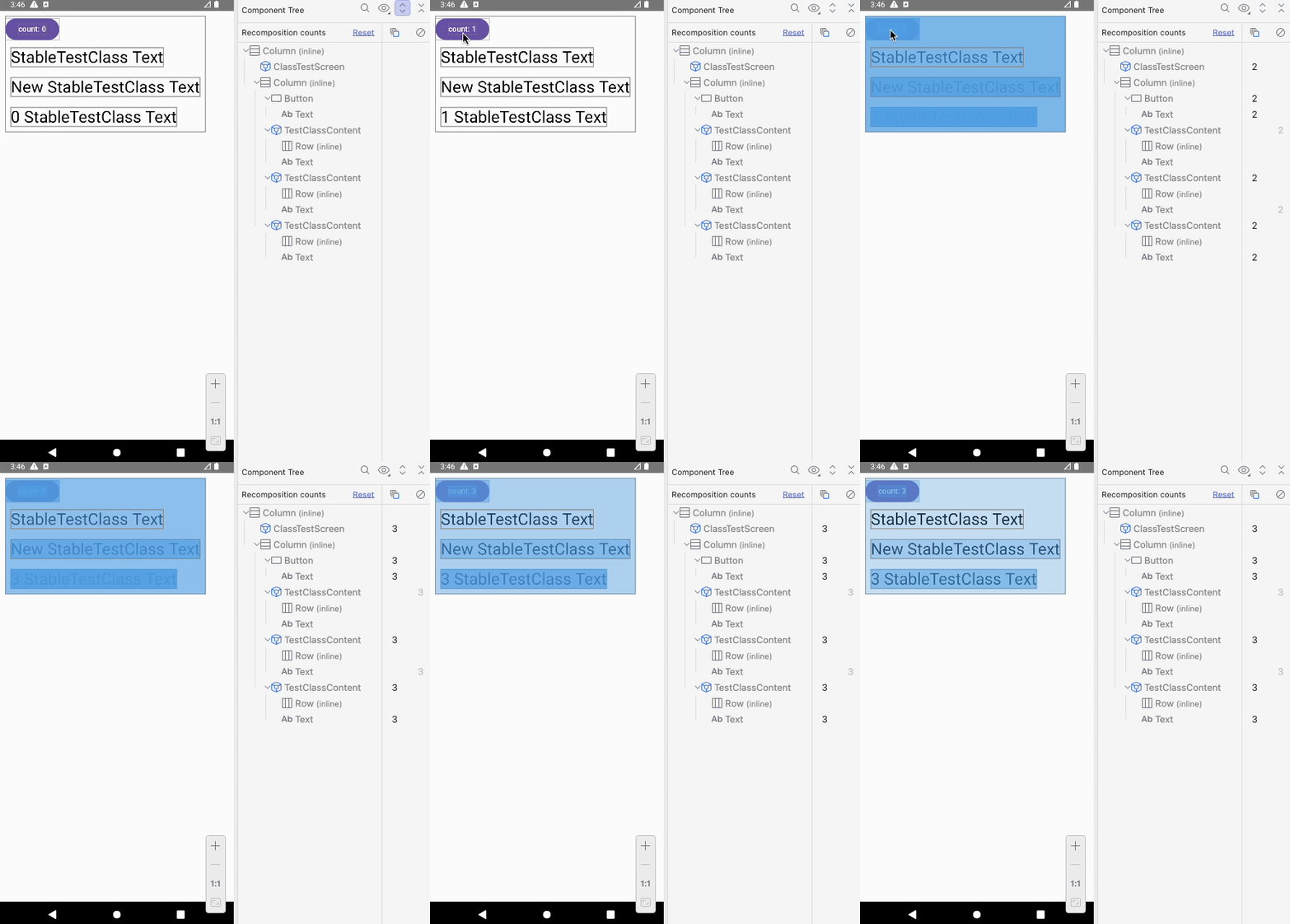
- 동일 조건에서
@Stable을 추가했을 때 차이가 발생. - 기존 객체를 사용하는 경우 skip이 발생.
class + var 프로퍼티 조합 + @Immutable
@Immutable
class ImmutableTestClass(
    var text: String,
)

val immutableTestClass by remember { mutableStateOf(ImmutableTestClass("ImmutableTestClass Text")) }
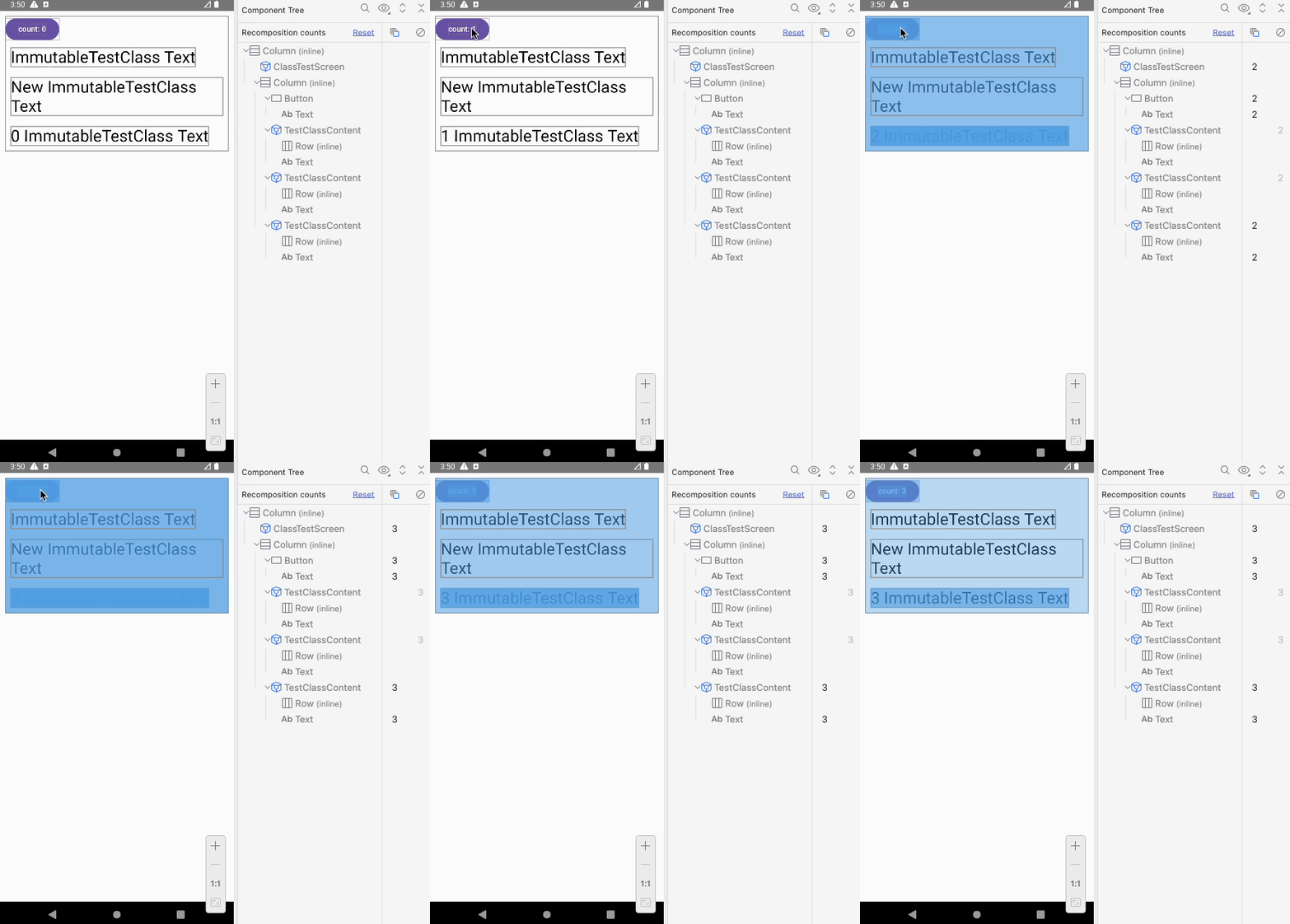
@Immutable을 사용하면 같은 property 값으로 새 객체를 생성한 경우에도 skip이 발생
class + var 프로퍼티 종합 + strong skipping mode
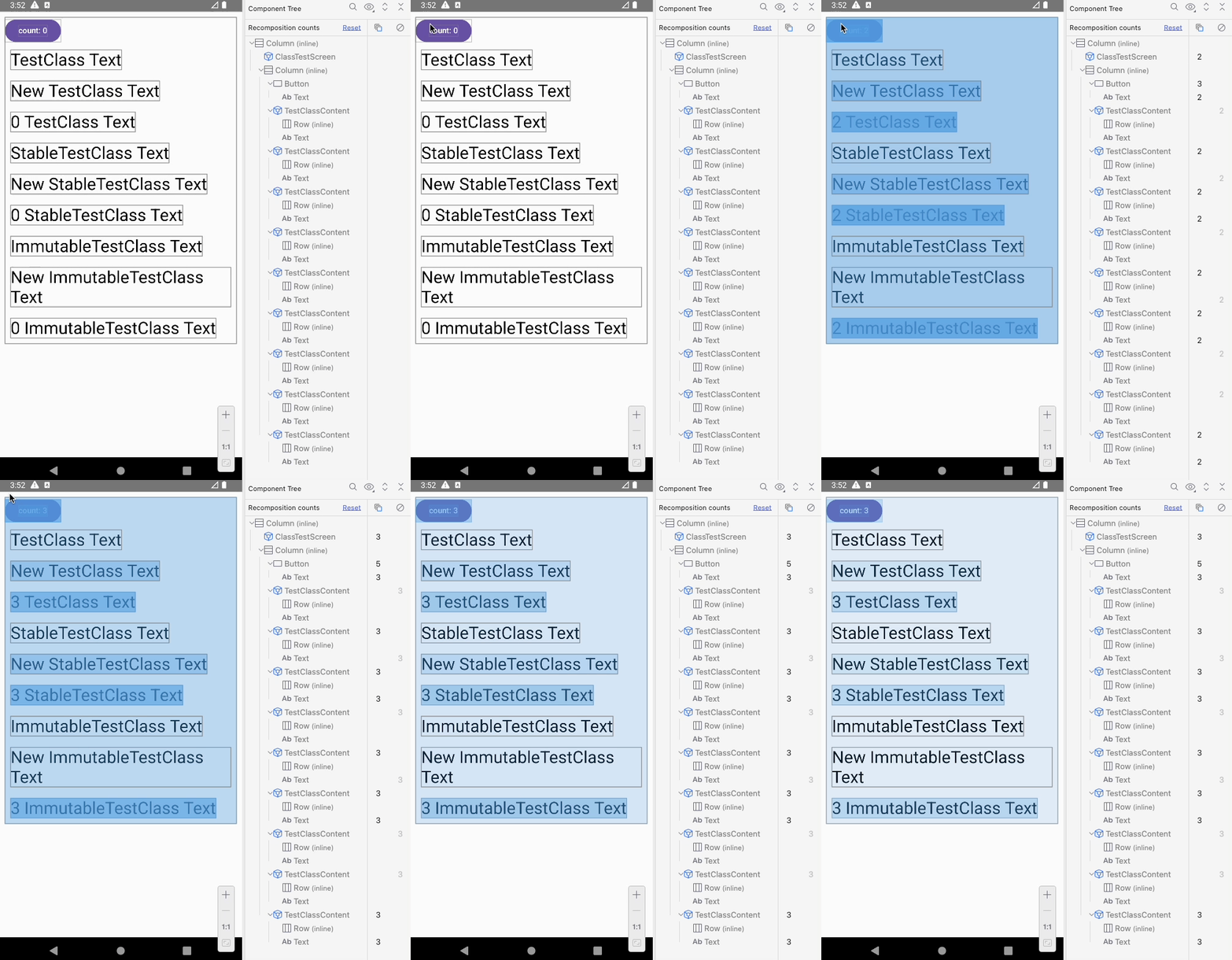
- Strong Skipping Mode를 활성화했을 때
- unstable한 TestClass 같은 객체일 경우 skip이 발생.
왜 이런 문제가 생길까?
실험을 정리하면 다음과 같습니다.
@Stable,@Immutable, Strong Skipping Mode 이 세 가지 조건이 적용된 경우,- recomposition 대상일 때 객체의 변화가 없으면 skip이 발생합니다.
그 이유는 다음과 같습니다.
@Stable, @Immutable 들은 StableMarker 를 사용하고 있고, StableMarker 의 특징은 다음과 같습니다.
StableMarkermarks an annotation as indicating a type is stable. A stable type obeys the following assumptions,
The result of
equalswill always return the same result for the same two instances.When a public property of the type changes, composition will be notified.
All public property types are stable.
https://composables.com/docs/androidx.compose.runtime/runtime-annotation/classes/StableMarker
StableMarker 에 의해 stable 처리가 되고 equals(객체 동등성)을 통해 두 인스턴스가 같은지를 비교합니다. 테스트에 사용 된 TestClass 는 equals 이 오버라이드 되어있지 않으므로 인스턴스 동등성(===)에 의해 skip 이 가능하게 됩니다.
@Stable, @Immutable 이 추가된 class 에서는 compose report에서 확인 시 stable 처리가 된 것을 볼 수 있습니다.
unstable class TestClass {
  stable var text: String
  <runtime stability> = Unstable
}
stable class StableTestClass {
  stable var text: String
}
stable class ImmutableTestClass {
  stable var text: String
}
그리고 강력건너뛰기 모드 에서는 unstable 일 경우 인스턴스 동등성 (===)을 비교하게 됩니다. TestClass 가 compose report 결과 unstable 이더라도 skip 이 된 이유 입니다.
Compose는 재구성 중에 컴포저블을 건너뛰야 할지 결정하기 위해 각 매개변수의 값을 이전 값과 비교합니다. 비교 유형은 매개변수의 안정성에 따라 다릅니다.
불안정한 매개변수는 인스턴스 동등성 (
===)을 사용하여 비교됩니다.안정적인 매개변수는 객체 동등성 (
Object.equals())을 사용하여 비교됩니다.
https://developer.android.com/develop/ui/compose/performance/stability/strongskipping?hl=ko
요약
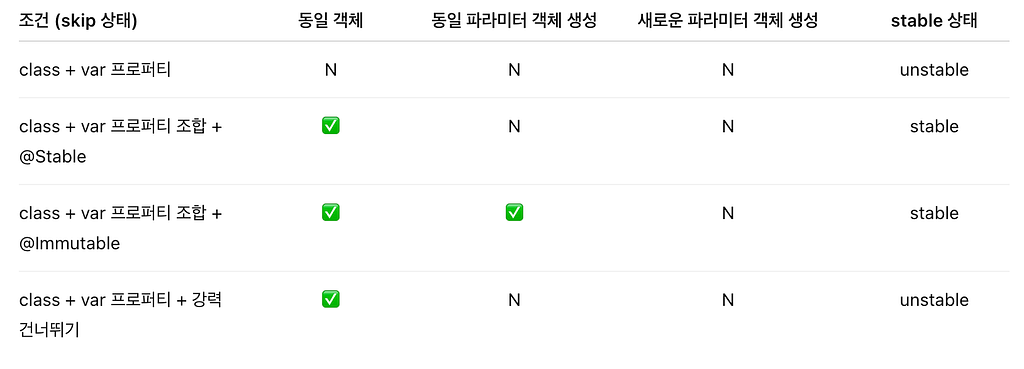
- stable 상태에 class 는 인스턴스 동등성에 의해 skip 처리.
- 강력 건너뛰기 모드 일 시 unstable 일 경우 인스턴스 동등성 비교 처리.
data class 동일 비교
data class 에도 동일하게 테스트를 하여 어떤 결과를 나타나는지 확인해 보겠습니다. class 테스트와 동일한 환경에서 테스트 했으며 간략하게 결과 위주로 나열하겠습니다.
data class TestDataClass(var text: String)

@Stable
data class StableTestDataClass(var text: String)

@Immutable
data class ImmutableTestDataClass(var text: String)
unstable class TestDataClass {
  stable var text: String
  <runtime stability> = Unstable
}
stable class StableTestDataClass {
  stable var text: String
}
stable class ImmutableTestDataClass {
  stable var text: String
}
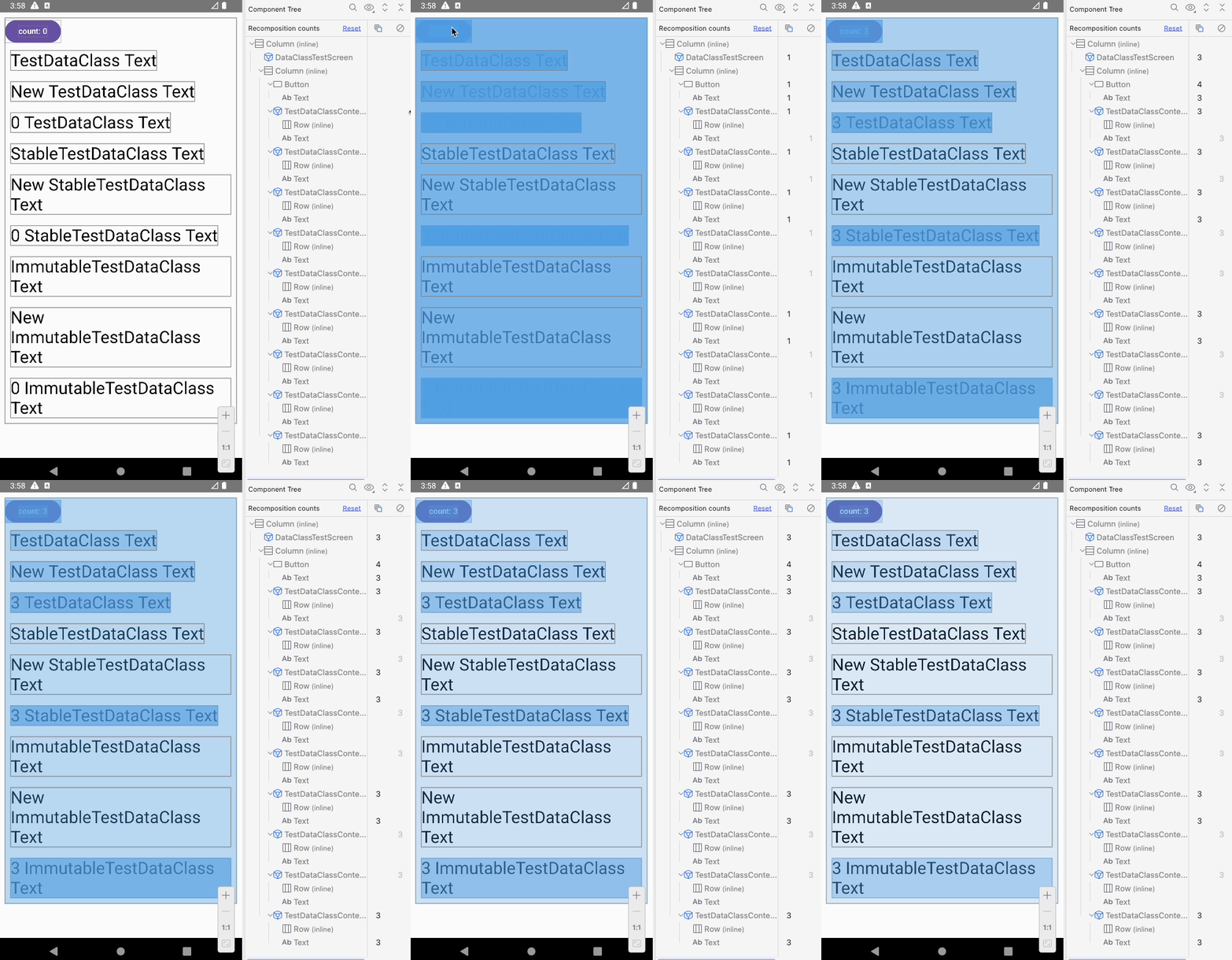
- data class 마찬가지로 unstable 을 위해 var property 를 사용.
- 강력 건너뛰기 off 상태이며
@Stable,@Immutable경우 stable 상태로 적용됨. - 일반 class 와 다르게 stable 상태일 때 객체를 새로 생성하더라도 public property 가 동일하다면 skip 이 발생.
요약
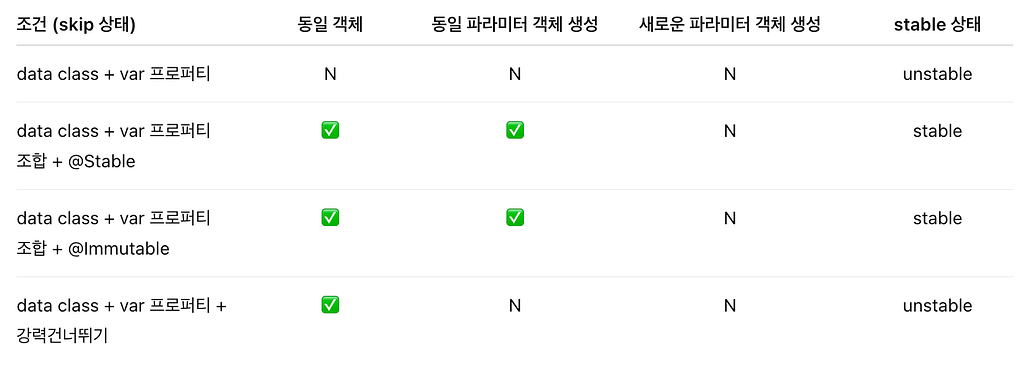
- stable 상태에 data class 는 객체 동등성 비교에 의해 skip 처리.
- 강력 건너뛰기 모드 일 시 unstable 일 경우 인스턴스 동등성 비교 처리.
class 와는 다른 결과가 나왔습니다. 위에서 설명드렸던 것처럼 @Stable, @Immutable 은 stable 처리로 인해 객체 동등성 비교를 진행하게 됩니다. data class 경우 equals 구현이 되어 있으므로 내부 public property 가 같으면 동등하다고 판단을 합니다.
그런데 강력 건너뛰기 모드일 때, 동일 property를 가지는 data class에서는 왜 skip 이 되지 않았을까요? 그 이유는 unstable 상태의 비교는 인스턴스 동등성으로 비교한다고 했습니다. 동일 객체인지를 판단하기 때문에 public property 가 같더라도 객체가 다르기 때문에 skip 이 되지 못한 것입니다.
class equals 구현 후 stable vs unstable 비교
테스트 결과 stable, unstable에 따라 동등성 비교의 차이점이 발생한다는 것을 알게 되었습니다. 그래서 stable 상태에 따라 어떤 결과를 보여주는지 확인해 보겠습니다.
테스트는 일반 class에 public property를 var, val 차이를 두었으며, 이는 stable 차이점을 주는 변경점입니다. 그리고 equals를 구현하여 객체 비교를 진행하는지 판단하도록 하였습니다.
class UnstableEqualTestClass(
    var text: String,
) {
    override fun equals(other: Any?): Boolean {
        if (this === other) return true
        if (javaClass != other?.javaClass) return false

        other as UnstableEqualTestClass

        return text == other.text
    }

    override fun hashCode(): Int {
        return text.hashCode()
    }
}

class StableEqualTestClass(
    val text: String,
) {
    ... // 이하 동일
}
unstable class UnstableEqualTestClass {
  stable var text: String
  <runtime stability> = Unstable
}
stable class StableEqualTestClass {
  stable val text: String
  <runtime stability> = Stable
}
요약
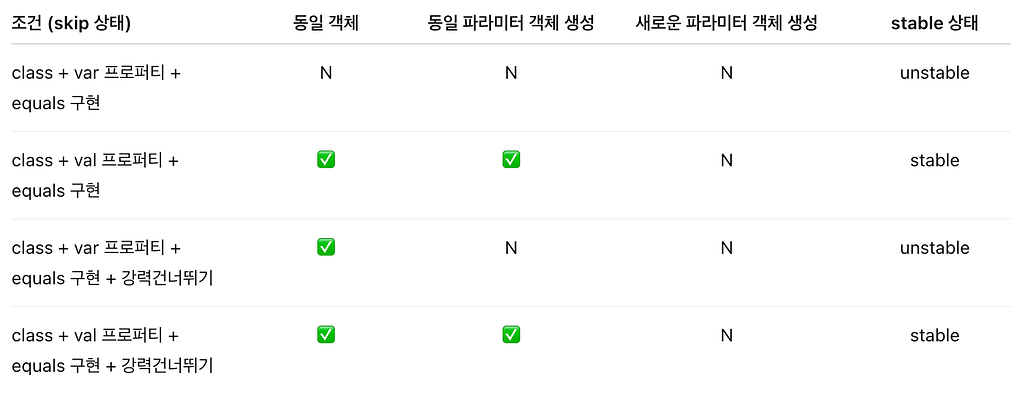
- public property 가 val이고, stable(primitive type)일 경우 stable 처리. (중요)
- stable 일 경우 객체 비교(==, equals) 진행.
- unstable일 경우 강력 건너뛰기 일 때만 인스턴스 동등성 비교를 함. (equals 비교 X)
Stable, Immutable 의 제약사항
베드 케이스 테스트는 모두 unstable 객체를 사용하였습니다. 그리고 @Stable, @Immutable 이 어떤 결과를 나타나는지 확인하기 위해 사용을 하였고, stable 이 적용됨을 확인하였습니다. 하지만 이는 올바른 사용 방법이 아닙니다.
android developers 에서 명시된 것처럼 stable만을 처리를 하기 위한 도구가 아닌 개발자가 컴파일러에게 불변 상태를 약속하는 것과 같습니다.
경고: 이러한 주석은 그 자체로는 클래스를 변경할 수 없거나 안정적으로 만들지 않습니다. 대신 이러한 주석을 사용하여 컴파일러와의 계약을 선택합니다. 클래스에 잘못 주석을 달면 재구성이 중단될 수 있습니다.
https://developer.android.com/develop/ui/compose/performance/stability/fix?hl=ko
또한 Immutable 에서 마찬가지로 public property 의 불변을 기준으로 컴파일러와 약속을 가집니다.
The immutability of the class is not validated and is a promise by the type that all publicly accessible properties and fields will not change after the instance is constructed.
https://composables.com/docs/androidx.compose.runtime/runtime-annotation/classes/Immutable
추가로 public property 의 변경 방법은 두 가지가 있습니다. data class 에서 copy 를 통한 변경과 class 에서 mutableStateOf 사용하여 state 변경을 예로 들 수 있겠습니다. property 가 불변의 속성을 가지기 때문에 위 방식을 통해 composition 을 통지할 수 있습니다.
When a public property of the type changes, composition will be notified.
https://composables.com/docs/androidx.compose.runtime/runtime-annotation/classes/Stable
Summary
베드 케이스의 실험을 통해 stable의 중요성을 알게 되었습니다.
어쩌면 이 글을 읽고 있는 개발자분들 중 단순히 stable 처리를 하기 위해 @Stable, @Immutable 을 사용하고 있거나, 아니면 kotlin 2.0.20 이후 버전에 의해 자동으로 강력 건너뛰기로 인한 skip 이 처리되고 있을지 모릅니다. 본인의 프로젝트의 compose 가 어떻게 skip 이 진행되고 있었는지 한 번쯤 고민을 하고 있었다면 해당 글을 통해 도움이 되셨길 바랍니다.
다음 글은 Compose 안정성을 위해 UiModel 을 어떤 식으로 구성을 하며, LazyList 화면 Item을 어떻게 운영하는지에 대해 알아보도록 하겠습니다.
긴 글 읽어주셔서 감사합니다.