Engineering
Safe Deploy - 안전하게 L4 에서 제외하는 방법
2019년 6월 14일
원문에서 보기 ↗목차
- L4 스위치에서 서비스 health check 하는 방법
- Port health check 방식
- L7 health check 방식
- L4 스위치에서 서비스가 제외시키기
- L4 스위치에서 서비스 제외시키기
- 유저 인입 확인
- 종합 - 안전하게 서비스 내리기
- 예제 스크립트 - L7 health check up/down
- 결론
L4 스위치에서 서비스 health check 하는 방법
Port health check (L4) 방식
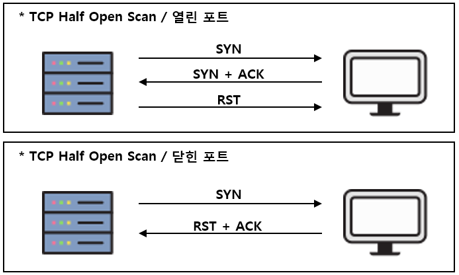
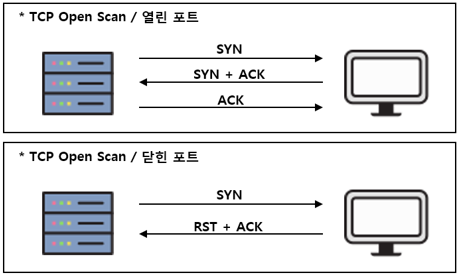
- OSI-7 layer 에서 layer 4에 속하는 TCP 의 연결 방식(SYN/ACK/RST)을 사용하여 health check 하는 방식입니다.
Port health check 종류
- Half-Open 방식 (왼쪽이 L4 스위치, 오른쪽이 서버입니다.)
- TCP Open 방식 (왼쪽이 L4스위치, 오른쪽이 서버입니다)
L7 health check 방식
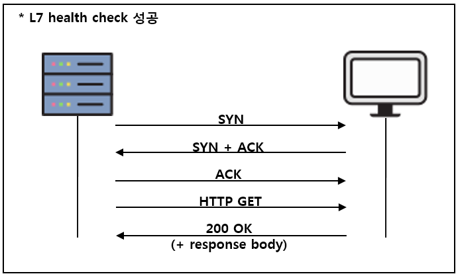
- HTTP로 L7 URL 을 가져와 response status 와 response body를 검증하여 health check 하는 방식입니다. (response body 검증은 옵션입니다.)
- health check UP 상태 flow (아래 flow 중 하나라도 오류 시엔 DOWN 상태로 판단합니다.)
L4 에서 서비스 제외시키기
- 당연한 말이지만, L4 스위치가 health check 시 서비스가 down 인 것으로 인식시키면 됩니다.
- 하지만 health check 를 내린다고(down) 해서 바로 L4 를 통한 유저 인입이 없어지는 건 아니기 때문에, 저희는 실제 유저 인입이 발생하지 않는지를 확인해야 합니다. (L4 스위치의 health check 방식은 polling 이므로 health check 주기가 있어 몇 초 간은 신규 유저 인입이 생길 수 있습니다.)
L4 스위치에서 서비스 제외시키기
Port health check 방식
- 서비스 서버에서 L4 health check ip에 대해 RST 를 보내도록 설정합니다.
- 예시 : iptables 로 RST 보내도록 설정하는 방법
#!/bin/bash
L4_HEALTHCHECK_IPS=("10.0.0.252" "10.0.0.253")
PORT=80

for i in ${L4_HEALTHCHECK_IPS[@]}
do
sudo iptables -A INPUT -s $i -p tcp --dport $PORT -j DROP #DISABLE HEALTH CHECK, $L4_HEALTHCHECK_IPS 로부터 $PORT 로 들어오는 요청을 DROP하는 방화벽 룰 추가
# sudo iptables -D INPUT -s $i -p tcp --dport $PORT -j DROP #ENABLE HEALTH CHECK, 위의 방화벽 룰을 삭제
done
- L4 스위치의 health check ip (=L4 스위치가 health check를 시도할 때 사용하는 ip)는 서버에서 tcpdump 를 통해 주기적으로 연결을 요청하는 IP를 찾았습니다. (또는 네트워크 담당자께 문의드리는 방법도 있을 것 같습니다.)
L7 health check 방식
- response code 200(OK) 외에 다른 걸(ex. 404) 보내도록 설정합니다.
유저 인입이 없는 걸 검증하기
유저 인입을 확인하기 전에, TCP connection status 에 대해 간단하게 설명하겠습니다.
TCP connection status
주로 보이는 몇 가지만 설명하겠습니다.
- LISTEN : 서버에서 포트가 오픈되어 user 인입을 기다리는 상태입니다.
- ESTABLISHED : 서버와 user 간에 connection 이 맺어져, 실제 통신이 이루어지는 상태입니다.
- CLOSE_WAIT : 서버 측의 상태로, (데이터를 모두 받은)유저가 보낸 연결 해제 요청(FIN)을 받은 상태입니다.
- TIME_WAIT : 유저 측의 상태로 서버로부터 FIN(연결 종료) 을 받은 상태입니다.
- 참고 - TCP status trasition diagram (출처 : IBM Knowledge Center)
유저 인입 검증
- 유저가 인입되어 실제 통신이 발생하는 상태는 ESTABLISHED 상태입니다.
- 그러므로 유저 인입이 없다는 건 TCP ESTABLISHED status 가 새로 발생하지 않는 상태입니다.
#!/bin/bash

SERVICE_PORT=443
L4_HEALTH_CHECK_IPS=("10.0.0.253" "10.0.0.254")

grep_cond_exclude_ips=$(IFS='|'; echo "${L4_HEALTH_CHECK_IPS[*]}") #(L7 health check 방식에서) L4 health check ip 제외
if [ $(sudo netstat --tcp -np | grep ":$SERVICE_PORT " | grep -vE "$grep_cond_exclude_ips" | grep -i established | wc -l) -gt 0 ];
then
    echo "User connection still exist" >&2
    exit 1 #exit with error
else
    echo "NO connection"
    exit 0
fi
- (L7 health check 인 경우에) L4의 health check ip(=L4 스위치가 health check를 시도할 때 사용하는 ip) 의 ESTABLISHED status 는 제외했습니다.
- 서비스의 health check 가 down 되더라도 L4 에서는 지속적으로 health check 를 시도하므로 L4 의 health check ip 로 계속 ESTABLISHED connection 이 생기기 때문입니다.
- L4 health check ip 는 apache access log 에서 찾았습니다.(반복적으로 health check page 를 요청하는 IP)
종합 - 안전하게 서비스 내리기
- 위의 내용을 종합하자면, 안전하게 서비스를 내리기 위해선 다음 절차를 실행해야 합니다.
- 서비스의 L4/L7 health check 를 down으로 변경
- 유저 인입이 없는 것 검증 (새로운 유저가 인입될 수 있으므로 시간을 두고 반복해서 검증 필요)
- 톰캣 stop
예제 - L7 health check up/down
#!/bin/bash

ESTB_CHECK_MAX=3
RETRY_MAX=5
SLEEP_TIME=3 #second

SERVICE_PORTS=("80" "443")
L4_ENABLE_URL="http://127.0.0.1/actuator/health/up"
L4_DISABLE_URL="http://127.0.0.1/actuator/health/down"
SERVICE_CHECK_URL="http://127.0.0.1/actuator/health"

L4_HEALTH_CHECK_IPS=("10.0.0.253" "10.0.0.254")

func_disable_l7()
{
    curl -XPUT $L4_DISABLE_URL
}

func_enable_l7_repeat()
{
    retry=0
    while [ $retry -lt $RETRY_MAX ]
    do
        curl -XPUT $L4_ENABLE_URL # Enable health check
        sleep $SLEEP_TIME
        [[$(curl -LI $SERVICE_CHECK_URL -o /dev/null -w '%{http_code}' -s | grep 200 | wc -l) -eq 1]] && break
        ((retry++))
        echo "Service is down, retrying..."
    done

    if [ $retry == $RETRY_MAX ];
    then
        echo "FAILED to enable L7 healthcheck" >&2
        exit 1
    else
        echo "SUCCESS to start"
        exit 0
    fi
}

func_check_no_conn_repeat()
{
    estb_check_count=0
    retry_count=0
    grep_cond_ports=$(printf ":%s |" ${SERVICE_PORTS[*]} | head -c -1)
    grep_cond_exclude_ips=$(IFS='|'; echo "${L4_HEALTH_CHECK_IPS[*]}") #exclude; because L4 request continuously regardless of health status
    while [ $estb_check_count -lt $ESTB_CHECK_MAX -a $retry_count -lt $RETRY_MAX ]
    do
        sleep $SLEEP_TIME
        echo "Checking established connection..."
        conn=$(netstat -nt | grep -E "$grep_cond_ports" | grep -vE "$grep_cond_exclude_ips" | grep ESTABLISHED)
        if [ $(echo $conn | wc -l) -gt 0 ];
        then
            echo "connection exist"
            echo -e "$conn"
            estb_check_count=0
            ((retry_count++))
        else
            echo "NO connection"
            ((estb_check_count++))
        fi
    done

    if [ $retry_count == $RETRY_MAX ];
    then
        echo "User connection still exist" >&2
        exit 1 #exit with error
    else
        exit 0
    fi
}

case "$1" in
        down)
                func_disable_l7
                sleep 10
                func_check_no_conn_repeat
                ;;
        up)
                func_enable_l7_repeat
                ;;
        *)
                echo $"Usage: $0 {down|up}"
esac
결론
루프백(ex. lo:0) 인터페이스를 내리지 않아도 얼마든지 L4 에서 서비스를 제외할 수 있습니다.
- 요즘이야 모두 L7 health check 방식을 사용하시지만, 예전에 port health check 방식을 사용할 당시엔 루프백 인터페이스를 내리던 적이 종종 있었습니다.
- DSR (Direct Server Return) 방식에서 루프백 인터페이스를 내리게될 경우 client 측에서 패킷을 드롭하게 되므로, request fail 이 발생할 수 있습니다. (client 는 분명 L4 VIP 로 보냈는데 루프백이 없는 서버는 서버의 로컬 IP로 client 에게 response 패킷을 보낼테고, client 는 혼란에 빠진 나머지 패킷을 DROP..)
배포 시 패킷 손실을 최소화 하려면 ESTABLISHED 된 TCP Connection 까지 확인해야 합니다.