DevOps
Docker Buildx로 Multi-Archtecture Image 빌드하기
2020년 10월 5일
원문에서 보기 ↗뭘 하려고 했나?
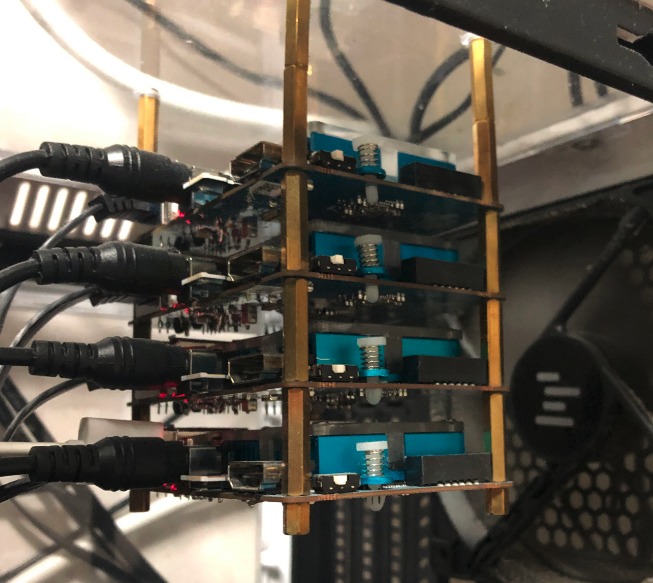 최근 구글 클라우드 프로젝트에 쿠버네티스 클러스터를 생성했다가 과금 폭탄을 맞고 나서, 금전적 비용없이 멀티 노드 클러스터를 실습할 수 있는 환경을 구성하기 위해 집에서 놀고있는 네 대의 개발 보드 ordroid-xu4 활용해보기로 했습니다.
뭐가 안되었나?
Docker를 세팅하는 과정에서 문제가 있었습니다. Docker를 설치하고 테스트하기 위해 간단히 빌드한 이미지를 pull 받아서 컨테이너를 실행하면 아래와 같이 실패했습니다.
jaeeunyoo@skynet-201:~$ docker pull frontiersofme/py-app
Using default tag: latest
latest: Pulling from frontiersofme/py-app
...
Status: Image is up to date for frontiersofme/py-app:latest
docker.io/frontiersofme/py-app:latest
jaeeunyoo@skynet-201:~$ docker run -it -p 8081:8081 frontiersofme/py-app
standard_init_linux.go:211: exec user process caused "exec format error"
왜 안되었나?
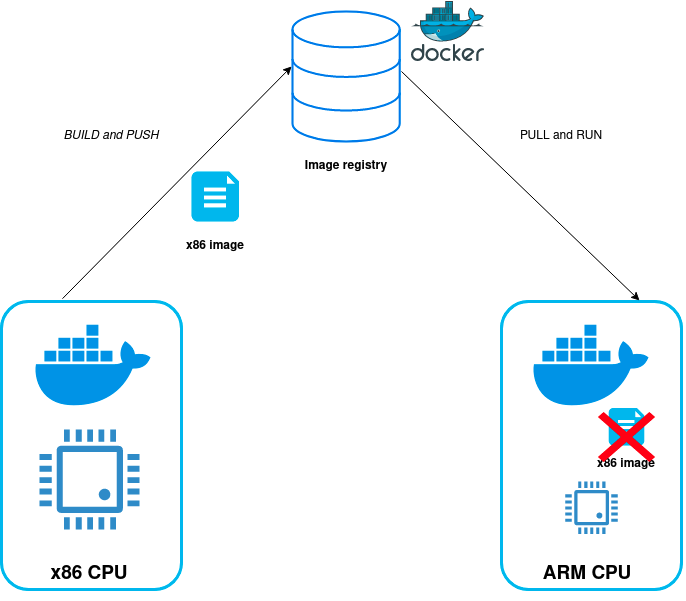
위 에러 메세지를 검색하면, shebang을 쓰지 않아서, 실행 권한이 없어서 등 여러 견해가 있으나 제 상황에서는 빌드된 이미지의 실행 환경(cpu 아키텍쳐)가 다르기 때문이었습니다.(xu4는 arm32v7)
hello-world는 왜 될까?
jaeeunyoo@skynet-201:~$ docker run hello-world

Hello from Docker!
This message shows that your installation appears to be working correctly.
...
그런데 hello-world 예제는 아래와 같이 잘 실행이 되었는데요. github에 공개되어있는 hello-world 프로젝트를 살펴보면, Dockerfile에 major한 아키텍쳐에 대해 cross-compile 하는 것을 확인했습니다,
# explicitly use Debian for maximum cross-architecture compatibility
FROM debian:buster-slim

RUN set -eux; \
	apt-get update; \
	apt-get install -y --no-install-recommends \
		ca-certificates \
		gnupg dirmngr \
		wget \
		\
		gcc \
		libc6-dev \
		make \
		\
		libc6-dev-arm64-cross \
		libc6-dev-armel-cross \
		libc6-dev-armhf-cross \
		libc6-dev-i386-cross \
		libc6-dev-mips64el-cross \
		libc6-dev-ppc64el-cross \
		libc6-dev-s390x-cross \
		\
		gcc-aarch64-linux-gnu \
		gcc-arm-linux-gnueabi \
		gcc-arm-linux-gnueabihf \
		gcc-i686-linux-gnu \
		gcc-mips64el-linux-gnuabi64 \
		gcc-powerpc64le-linux-gnu \
		gcc-s390x-linux-gnu \
		\
		file \
	; \
	rm -rf /var/lib/apt/lists/*
    ...
이 밖에도 이기종 디바이스에서 실행시키기 위한 빌드 방법은 이 밖에도 여러가지 있었습니다만 임베디드 SW개발자가 아닌 이상 주된 관심사가 아닐 뿐만 아니라 더 나은 빌드 및 배포를 위해 Docker를 사용하려는 입장에서는 꽤나 번거롭다는 생각이 들었습니다.
Docker Buildx 소개
포기하려던 찰나에 Docker Buildx를 알게되었는데요, Buildx는 여러 다른 플랫폼 용으로 빌드하는 기능 등을 포함하는 CLI 확장 플러그인으로 19.03 버전 부터 사용할 수 있습니다. 아직은 experimental feature로 제공되고 있기 때문에 사용하려면 해당 기능을 직접 활성화 해야합니다.
실제 사용
MacOS 기준으로 작성되었습니다.
Docker Version 확인
NHNEntui-MacBook-Pro-45:~ nhnent$ docker --version
Docker version 19.03.12, build 48a66213fe
19.03 부터 적용되므로 이하 버전에서는 사용할 수 없습니다.
Docker CLI Experimental 활성화
MacOS 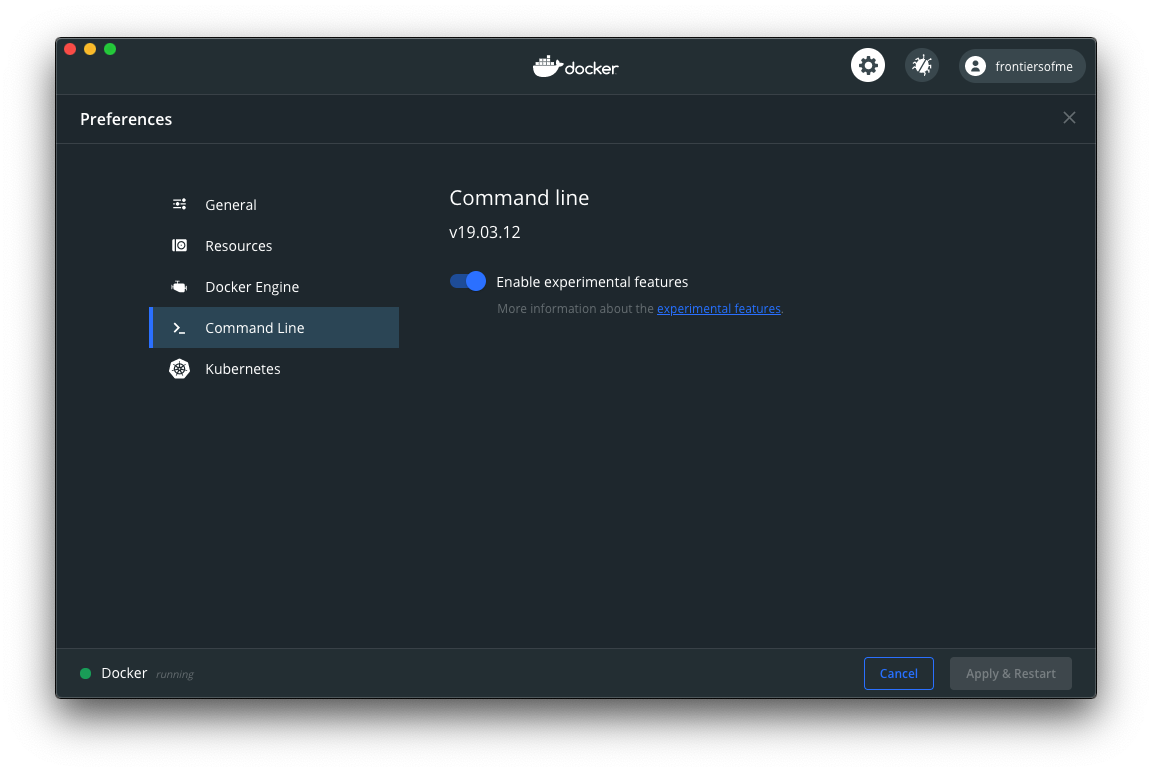
# 활성화 전
NHNEntui-MacBook-Pro-45:~ nhnent$ docker buildx
docker: 'buildx' is not a docker command.
See 'docker --help'

# 활성화 후
NHNEntui-MacBook-Pro-45:~ nhnent$ docker buildx

Usage:	docker buildx COMMAND

Build with BuildKit

Management Commands:
  imagetools  Commands to work on images in registry

Commands:
  bake        Build from a file
  build       Start a build
  create      Create a new builder instance
  inspect     Inspect current builder instance
  ls          List builder instances
  rm          Remove a builder instance
  stop        Stop builder instance
  use         Set the current builder instance
  version     Show buildx version information

Run 'docker buildx COMMAND --help' for more information on a command.
Builder Instance 확인
NHNEntui-MacBook-Pro-45:~ nhnent$ docker buildx ls
NAME/NODE DRIVER/ENDPOINT STATUS  PLATFORMS
default * docker
  default default         running linux/amd64, linux/arm64, linux/ppc64le, linux/s390x, linux/386, linux/arm/v7, linux/arm/v6
linux/amd64, linux/arm64, linux/ppc64le, linux/s390x, linux/386, linux/arm/v7, linux/arm/v6 들에 대해 빌드가 제공됩니다.
Builder 생성 및 사용 설정
docker buildx create --name [builder instance 명] --driver [드라이버 이름] --use
# multi-arch-builder로 사용 설정
NHNEntui-MacBook-Pro-45:~ nhnent$ docker buildx create --name multi-arch-builder --driver docker-container --use
multi-arch-builder

# 현재 Builder Instance 정보
NHNEntui-MacBook-Pro-45:~ nhnent$ docker buildx inspect --bootstrap
[+] Building 6.0s (1/1) FINISHED
 => [internal] booting buildkit                                                                                                                                                                                                                                            6.0s
 => => pulling image moby/buildkit:buildx-stable-1                                                                                                                                                                                                                         5.0s
 => => creating container buildx_buildkit_multi-arch-builder0                                                                                                                                                                                                              1.0s
Name:   multi-arch-builder
Driver: docker-container

Nodes:
Name:      multi-arch-builder0
Endpoint:  unix:///var/run/docker.sock
Status:    running
Platforms: linux/amd64, linux/arm64, linux/riscv64, linux/ppc64le, linux/s390x, linux/386, linux/arm/v7, linux/arm/v6
Buildx로 Image Build & Push
NHNEntui-MacBook-Pro-45:multiarch nhnent$ docker buildx build --platform linux/arm/v7 -t frontiersofme/multiarch-py-app --push .
[+] Building 105.2s (8/8) FINISHED
 => [internal] load build definition from Dockerfile                                                                                                                                                                                                                       0.0s
 => => transferring dockerfile: 125B                                                                                                                                                                                                                                       0.0s
 => [internal] load .dockerignore                                                                                                                                                                                                                                          0.0s
 => => transferring context: 2B                                                                                                                                                                                                                                            0.0s
 => [internal] load metadata for docker.io/library/python:3.8                                                                                                                                                                                                             12.7s
 => [internal] load build context                                                                                                                                                                                                                                          0.0s
 => => transferring context: 28B                                                                                                                                                                                                                                           0.0s
 => [1/3] FROM docker.io/library/python:3.8@sha256:2c1045587e4452d49544c6dce92efe21c3b4b33864cfb56fdee66a2c8585c769                                                                                                                                                       39.4s
 => => resolve docker.io/library/python:3.8@sha256:2c1045587e4452d49544c6dce92efe21c3b4b33864cfb56fdee66a2c8585c769                                                                         ...
target 보드 Image Pull & 컨테이너 실행
# Image Pull
jaeeunyoo@skynet-201:~$ docker pull frontiersofme/multiarch-py-app
Using default tag: latest
latest: Pulling from frontiersofme/multiarch-py-app
e7cf402ee4b1: Already exists
cff6bd4a89fc: Already exists
e48f5852a753: Already exists
e58a93b33dd4: Already exists
a3c3db37cc57: Already exists
2c8297f1a358: Already exists
6d14eca818f3: Already exists
704121b65f11: Already exists
6cdf5a94358e: Already exists
9f9eec9ff6d5: Pull complete
a54ba2fcc3f8: Pull complete
Digest: sha256:3b46e7ef76d3512d31ddef962b07a5d46f999a9e10b7367d3548112b34af2cd7
Status: Downloaded newer image for frontiersofme/multiarch-py-app:latest
docker.io/frontiersofme/multiarch-py-app:latest

# 컨테이너 실행
jaeeunyoo@skynet-201:~$ docker run -it -p 10001:10001 frontiersofme/multiarch-py-app
 * Serving Flask app "app" (lazy loading)
 * Environment: production
   WARNING: This is a development server. Do not use it in a production deployment.
   Use a production WSGI server instead.
 * Debug mode: off
 * Running on http://0.0.0.0:10001/ (Press CTRL+C to quit)
192.168.0.3 - - [27/Aug/2020 23:47:25] "GET / HTTP/1.1" 200 -
192.168.0.3 - - [27/Aug/2020 23:47:25] "GET / HTTP/1.1" 200 -
192.168.0.3 - - [27/Aug/2020 23:47:25] "GET /favicon.ico HTTP/1.1" 404 -
..
마무리
지금은 실험적 기능정도로 제공되고 있으나 해당 기능에 대한 수요가 매우 많고, 실제로 저전력 고성능 ARM 64bit 기반 인스턴스를 제공하는 서비스도 늘어나고 있기 때문에 곧 정식 기능으로 포함되길 기대해봅니다.