Android
여기어때 Compose Perfomance 해결 이야기
Jonas여기어때
2024년 12월 31일
원문에서 보기 ↗Andriod 앱의 화면은 compose를 통해 많은 회사에서 개발이 되고 있습니다. 여기어때 또한 compose를 도입하였고 어느덧 2년 가까이 지나고 있습니다. 여기어때 안드로이드개발팀은 compose를 적용하기 위해 MVI 구조로 변경하거나 AbstractComposeView 사용하여 기존 화면에 compose를 적용하였습니다. 대부분의 안드로이드 개발자는 비슷한 전략을 통해 compose를 도입하였을 것이라 예상합니다. 그래서 이 글에서는 compose 변환에 관한 내용은 기술하지 않고 compose 적용 후 겪게 되었던 성능 문제에 관해 기술하려 합니다.
무엇이 문제였나요**?**
“화면이 끊기는 거 같아요"
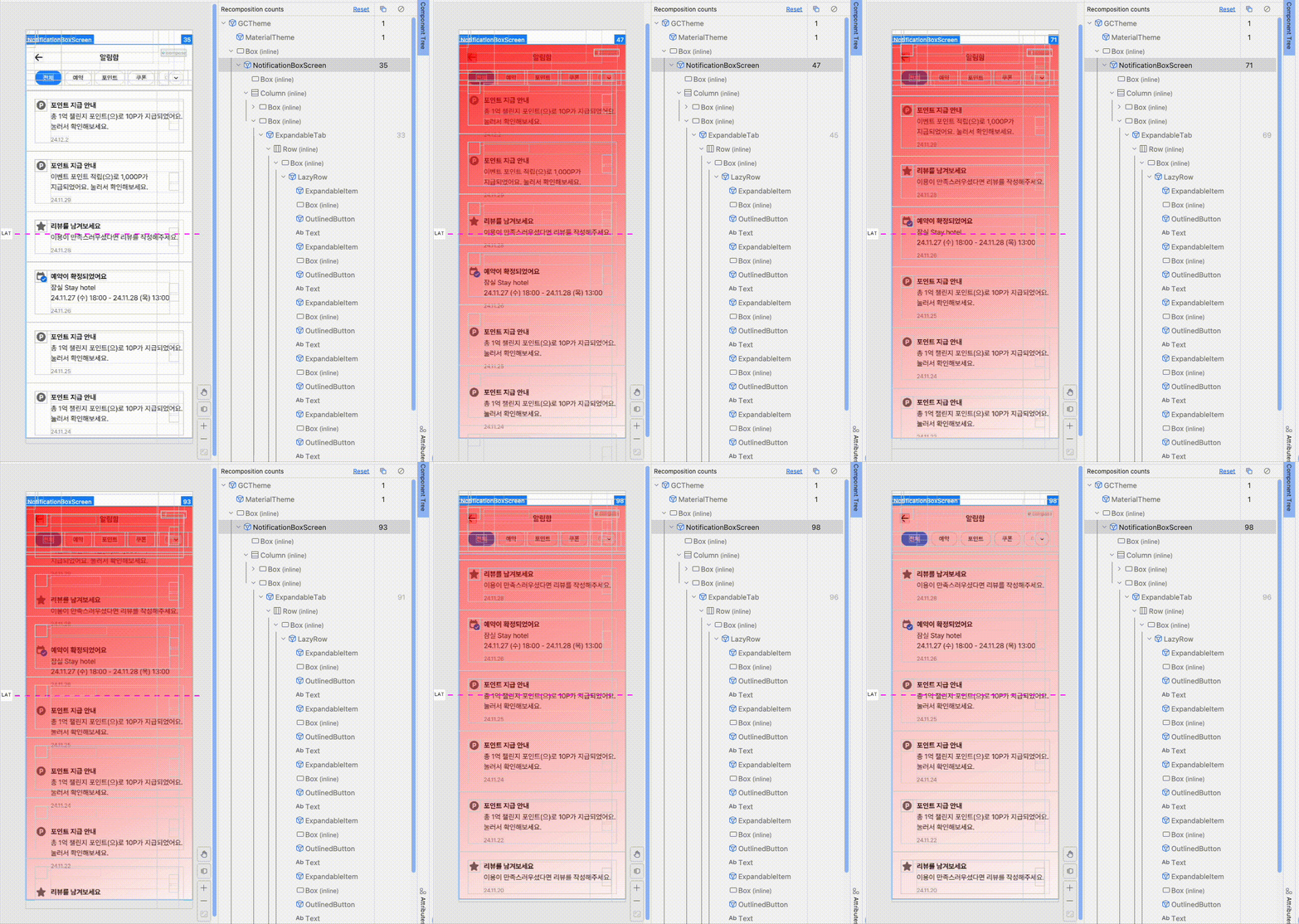
알림함 화면을 완성하고 테스트를 하는데 많지도 않은 리스트에서 성능이 좀처럼 나오지 않았습니다. recomposition이 스크롤 때마다 일어나는 것을 예상하여 Layout Inspector를 통해 recomposition 횟수를 측정하였습니다. 역시 스크롤 때마다 recomposition이 일어나고 있었습니다.
Stability in Compose
해결을 위해 compose performance 검토 중 안정성 가이드를 확인 할 수 있었습니다. 해답은 Android Developers에 이미 제공 되어있었습니다.
Stability in Compose | Jetpack Compose | Android Developers
Stable parameters : If a composable has stable parameters that have not changed, Compose skips it.
Unstable parameters: If a composable has unstable parameters, Compose always recomposes it when it recomposes the component’s parent.
stable과 unstable의 차이점이 명시되어 있습니다. unstable 상태를 의심하여 알림함을 구성하는 composable 함수에서 사용하는 ui class를 먼저 들여다봤습니다.
data class NotificationItem(
    val id: String? = null,
    val title: String? = null,
    val content: String? = null,
    val date: String? = null,
    val link: String? = null,
    val seen: Boolean = false,
    var read: Boolean = false, // 문제의 파라미터
    val icon: String? = null,
    val notifyType: String? = null,
    val type: NotificationType = NotificationType.IMPORTANT,
)
read 파라미터가 가변인 것을 확인 할 수 있었습니다.
Make the class immutable
Immutable : Indicates a type where the value of any properties can never change after an instance of that type is constructed, and all methods are referentially transparent.
Make sure all the class’s properties are both val rather than var, and of immutable types.
Primitive types such as String, Int, and Float are always immutable.
If this is impossible, then you must use Compose state for any mutable properties.
class를 불변으로 처리하라 명시 되어있습니다. 파라미터 중 하나라도 var이 있다면 unstable이 되기 때문에 모든 형식을 val로 변경하였습니다. 하지만 val 형식으로 변경하였지만, 여전히 성능저하가 나타났습니다.
문제는 화면을 구성하는 주요 component는 LazyColumn에서 사용되는 List에 있었습니다. compose 컴파일러는 List, Map, Set 같은 Collection이 불변인지를 확실할 수 없으므로 unstable하다고 표시합니다. Kotlinx Immutable Collections에서 Immutable Collection을 제공해 주고 있습니다. 해당 라이브러리에서 Immutable List로 변경하니 성능이 향상되었습니다.
Collection을 stable 처리하는 다른 방법 중 data class로 wrap하여 @Immutable annotate 처리를 할 수도 있으나 ImmutableList 이름에서 오는 직관적인 부분이 더 맘에 들어 Immutable Collections를 사용하기로 했습니다.
GitHub - Kotlin/kotlinx.collections.immutable: Immutable persistent collections for Kotlin
Diagnose stability issues
문제의 현상과 해결법을 알았습니다. 당연히 다른 화면들도 확인이 필요했습니다. 하지만 직접 코드를 확인하는 것은 번거로운 일이 아닐 수가 없습니다.
Compose compiler reports
compose 컴파일러는 안정성 추론 결과를 출력할 수 있습니다. Gradle 빌드를 통해 리포트를 출력하여 검토를 할 수 있었습니다.
Diagnose stability issues | Jetpack Compose | Android Developers
stable class NotificationItem {
  stable val key: AnyValue
  stable val id: String?
  stable val title: String?
  stable val content: String?
  stable val date: String?
  stable val link: String?
  stable val seen: Boolean
  stable val read: Boolean
  stable val icon: String?
  stable val notifyType: String?
  stable val type: NotificationType
  stable val appear: ComposeGtmOnAppear
  stable var isRead: MutableState<Boolean>
}
stable로 적용된 class의 결과입니다. (isRead의 MutableState는 이어질 후반 내용에서 자세히 다루겠습니다.)
unstable class AgePicker {
  unstable var data: List<ChildAge>
  stable val adapter: <no name provided>
  unstable var binding: CellAgePickerBinding
  <runtime stability> = Unstable
}
untable class입니다. data 파라미터가 var인 것과 List인 것으로 인해 unstable 상태임을 알 수가 있습니다. 그리고 출력물 중 cvs 파일을 통해 spreadsheet에서 한 번에 파악도 가능합니다.
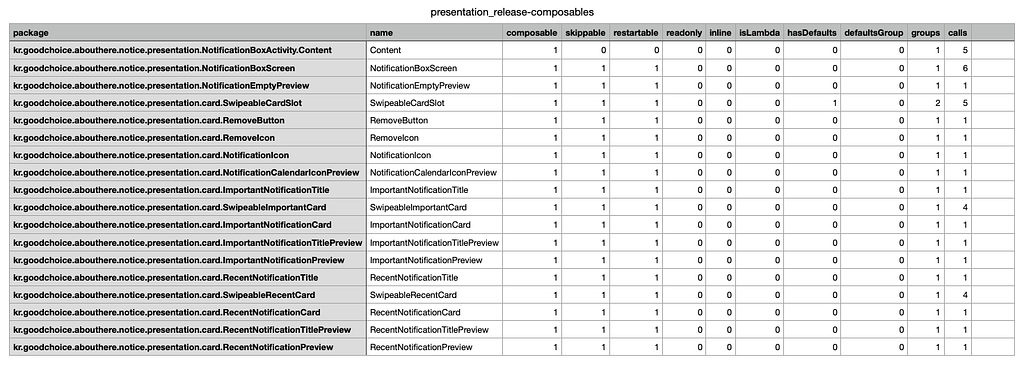
위 자료에서 우리의 관심사는 class의 stable 상태와 compose 함수의 skippable 여부입니다.
Skippable: If the compiler marks a composable as skippable, Compose can skip it during recomposition if all its arguments are equal with their previous values.
Restartable: A composable that is restartable serves as a “scope” where recomposition can start. In other words, the function can be a point of entry for where Compose can start re-executing code for recomposition after state changes.
compose 함수에서 stable 상태의 arguments를 사용한다면 컴파일러가 recomposition 동안 건너뛸 수 있도록 skippable 표시합니다. 단, arguments 가 이전값들과 동일하다면 말입니다. 동일여부에 대한 판단은 data class에서 제공되는 equal()을 통해 진행됩니다. 그래서 compose 함수에서 사용되는 ui class 는 모두 data class로 사용하고 있으며 해당 내용을 인지하고 설계하고 있습니다.
앞에 isRead라는 값이 MutableState class로 된 것이 있었습니다.
Stable: Indicates a type whose properties can change after construction. If and when those properties change during runtime, Compose becomes aware of those changes.
Compose mark type에 Immutable, Stable 중 하나인 Stable의 경우 객체 생성 후 속성이 변경될 수 있는 유형으로 runtime동안 속성이 변경되었을 때 해당 변경 사항을 인식한다고 합니다. 즉, recomposition 시 값의 변화가 없다면 skip이 될 수 있지만 속성이 변경되었을 경우는 감지하여 변화를 준다는 뜻입니다. 변경된 NotificationItem을 다시 보겠습니다.
@Stable
data class NotificationItem(
    val id: String? = null,
    val title: String? = null,
    val content: String? = null,
    val date: String? = null,
    val link: String? = null,
    val seen: Boolean = false,
    val read: Boolean = false,
    val icon: String? = null,
    val notifyType: String? = null,
    val type: NotificationType = NotificationType.IMPORTANT,
) {
    var isRead = mutableStateOf(read)
}

@Composable
private fun ImportantNotificationCard(
    data: NotificationItem,
...

if (data.isRead) {
            Box(modifier = Modifier
                .align(Alignment.TopStart)
                .fillMaxWidth()
                .height(cardHeight.pxToDp())
                .background(color = neutralLight56)
            )
}
...
isRead는 mutableStateOf로 만들어진 객체이며 compose 함수에서는 해당 값의 여부에 따라 노출이 결정되고 있습니다. ImportantNotificationCard 함수는 NotificationItem의 변화에만 recomposition이 일어나는데 NotificationItem이 변경되거나 기존 객체에 isRead 의 변경이 일어날 때만 재구성이 이루어집니다. 위 코드는 isRead 값의 변화가 외부에서 일어나며 변경에 대한 다음 두 가지 중 하나를 선택한 결과입니다.
첫 번째 변경 방법은 ViewModel에서 isRead 값을 바꾸고 다시 새로운 NotificationItem 객체를 전달하는 방법입니다. 여기어때는 MVI 구조를 가지고 있다고 앞서 언급했습니다. View에서 isRead에 대한 변화 event가 발생하면 ViewModel에서 data를 변경하여 다시 View로 전달이 됩니다. 두 번째는 ViewModel 에서 data 에 접근하여 isRead 의 상태를 변경하는 것입니다. 좀 더 편하게 상태를 변경할 수 있다는 장점이 보입니다.
두 가지 모두 각기 장단점이 존재합니다. 아주 복잡한 화면 구성일 경우, 예를 들어 이중 리스트 구조로 되어 있는 화면에서는 이점이 분명하게 나타나게 됩니다.
첫 번째 경우 값의 변화를 주기 위해 이중 리스트 모두를 탐색 후 변경 및 다시 값 전달되어야 하며 compose 함수에서는 변경된 모든 객체를 탐색해야 할 것입니다. 큰 비용이 발생합니다. 두 번째 방법은 isRead에 대한 객체 접근 후 변경만 이루어지니 비용 및 코드가 간결해집니다. 물론 MVI 구조에서는 맞지 않아 보이긴 하지만 말입니다.
해당 내용은 codelabs 에서 잘 설명이 되어있으니 참고 하시면 좋을 것 같습니다.
Note: A composable’s parameters don’t have to be immutable for Compose to consider it skippable. They can be mutable as long as the Compose runtime is notified of all changes. For most types this would be an impractical contract to uphold. However, Compose provides mutable classes that do uphold this contract for you, such as
MutableState,SnapshotStateMap, andSnapshotStateList.
추가로 MutableState와 같은 성격의 class는 두 가지가 더 있습니다. SanpshotState Map/List입니다. 이 역시 codelabs에 잘 설명되어 있어 사용법은 생략하겠습니다.
State in Jetpack Compose | Android Developers
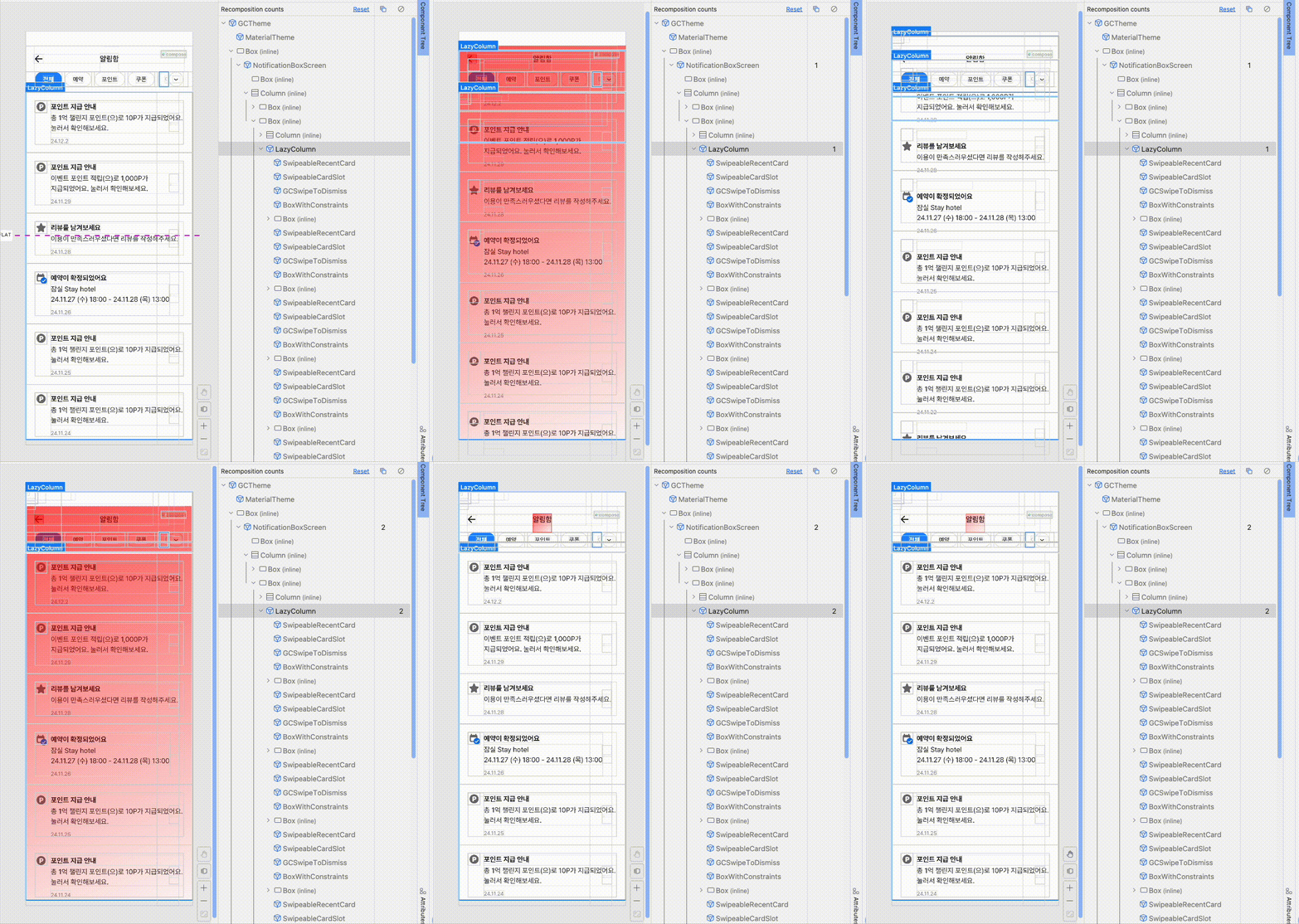
안정성 작업을 완료하기 위해 마지막으로 Layout Inspector를 확인해 봅니다. skip이 잘 작동하고 있지만, recomposition count가 여전히 줄어들지 않았습니다! 다시 코드를 확인합니다.
val firstVisibleItemIndex by remember { derivedStateOf { listState.firstVisibleItemIndex } }
val firstVisibleItemScrollOffset by remember { derivedStateOf { listState.firstVisibleItemScrollOffset } }

val isScrollInProgress by remember(firstVisibleItemIndex, firstVisibleItemScrollOffset) {
    derivedStateOf {
        firstVisibleItemIndex > 0 || (firstVisibleItemIndex == 0 && firstVisibleItemScrollOffset > 0)
    }
}
LazyColumn의 state를 활용하여 스크롤 상태를 확인하는 코드에서 문제를 일으키고 있었습니다. firstVisibleItemIndex, firstVisibleItemScrollOffset 값을 통해 스크롤 상태를 관리하기 위한 isScrollInProgress 을 derivedStateOf 으로 만들었습니다. firstVisibleItemIndex, firstVisibleItemScrollOffset 두 개의 값이 listState 내부값의 변화가 일어날 때마다 같이 쉴 새 없이 recomposition이 일어나고 있었습니다.
val isScrollInProgress by remember(listState) {
    derivedStateOf {
        val firstVisibleItemIndex = listState.firstVisibleItemIndex
        firstVisibleItemIndex > 0 || (firstVisibleItemIndex == 0 && listState.firstVisibleItemScrollOffset > 0)
    }
}
위와 같이 derivedStateOf 내부에서 한꺼번에 firstVisibleItem의 index와 offset을 조합하여 최종 boolean만 변경하여 불필요한 recomposition을 피하게 되었습니다.
Summary
Compose 화면의 Performance를 올리기 위해 크게 두 가지 작업을 하였습니다.
- class의 stable , function의 skippable 적용
- 불필요한 recomposition 추적 및 제거
위 두 가지 만으로도 알림함 화면은 눈에 띌 정도로 개선되었습니다. 그 외에도 다양한 성능 향상을 위한 방법들이 많이 있습니다. 모두를 담기에는 너무 긴 이야기가 될 것 같아 이만 여기서 마치도록 하겠습니다.
감사합니다.
참고
https://developer.android.com/develop/ui/compose/performance/stability