Engineering
LLM의 thinking_token_budget은 어떤 역할을 하는가?
2026년 8월 11일
원문에서 보기 ↗안녕하세요. teus입니다.
이번 포스팅은, opencode 등의 LLM에서 설정할 수 있는 thinking_token_budget에 대해서 다룹니다.
0. Effort
opencode나 claude code의 설정에 보면, 모델의 reasoningEffort를 수정 할 수 있습니다.
https://opencode.ai/docs/models/#configure-models
문제는 위와같이 reasoningEffort라고 지정되어있는 변수의 경우
직접적으로 어느정도의 reasoning을 진행할 지를 우리가 알 수는 없고
enable_thinking 활성화 여부와 system prompt의 일부분에 영향을 끼친다고 이야기 했습니다.
claude code의 reasoning effort는 vllm에도 효과가 있는가?
1. thinking_token_budget
이때 vLLM설정에 보면, thinking_token_budget이라고 해서
LLM의 reasoning 과정에서 최대 얼마만큼의 token을 사용할 수 있을지를 범위를 정해줄 수 있습니다.
https://docs.vllm.ai/en/stable/features/reasoning_outputs/#thinking-budget-control
vllm serve Qwen/Qwen3-0.6B \
    --reasoning-parser qwen3 \
    --reasoning-config '{"reasoning_start_str": "<think>", "reasoning_end_str": "I have to give the solution based on the reasoning directly now.</think>"}'
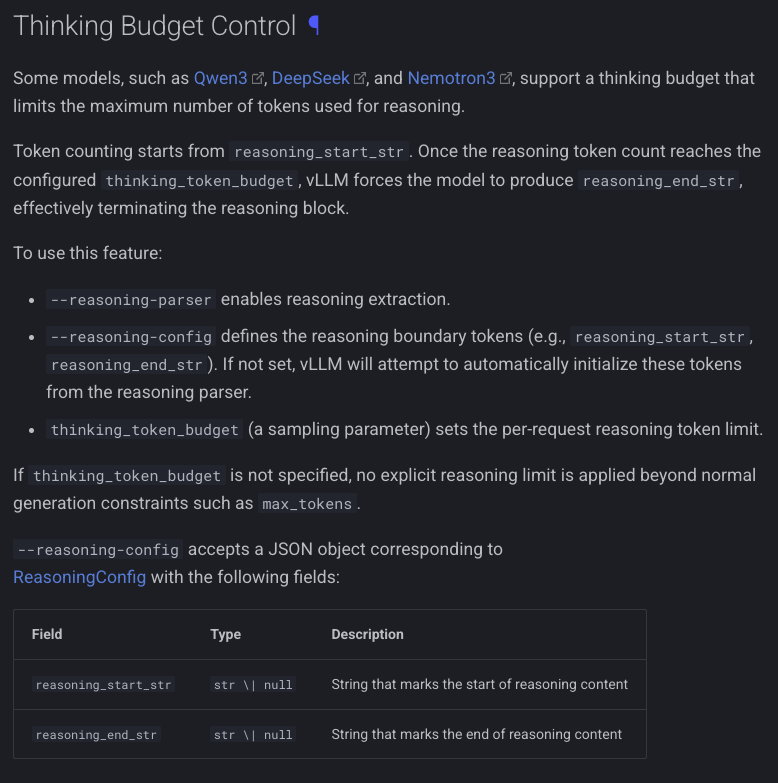
위 config 같은 경우 vLLM상에서 설정할 수도 있지만
유저측에서 LLM을 실행할 때 별도로 thinking_token_budget 을 추가해서 보낼 수가 있습니다.
{
  "$schema": "https://opencode.ai/config.json",
  "model": "vllm/vllm_model",
  "provider": {
    "vllm": {
      "npm": "@ai-sdk/openai-compatible",
      "name": "MY vllm",
      "options": {
        "baseURL": "http://mylocalllm/v1",
        "apiKey": "..."
      },
      "models": {
        "vllm_model": {
          "name": "UserBigModel",
          "reasoning" : true,
          "options" : {
            "reasoningEffort" : "high",
            "thinking_token_budget": 21500
          }
        }
      }
    }
  }
}
opencode 기준으로 opencode.jsonc 을 수정해 줌 으로써, LLM에 요청을 보낼 때 위와같이 추가해 보내줄 경우 요청에 반영이 되어 날라갑니다.
{
  "model": "vllm_model",
  "max_tokens": 32000,
  "thinking_token_budget": 21500,
  "reasoning_effort": "high",
  "messages": [
    {
...
해당 변수 관련해서 주의할 점은
해당 변수는
LLM한테 21500만큼 생각을 해! -> X
아무리 많이 생각해도, 21500만큼은 하지마 -> O
생성되는 thinking token의 생성량을 제한하는 역할을 할 뿐
LLM 모델한테 더욱 생각을 깊게 하는 역할을 하지 않는다는 점 입니다.
# https://github.com/vllm-project/vllm/blob/f2654939e69b4069b13977e9aef3e31d4dcaf051/vllm/v1/sample/thinking_budget_state.py#L439
...
    elif remaining_budget <= 0:
        state["force_index"] = [0]
...
그래서, LLM이 thinking과정에서 중간에 멈추지 않게 하려면 해당하는 budget을 -1로 설정해주면, unlimited 상태로 최대한의 혼자말 시간을 보장해줄 수가 있습니다.
# https://github.com/vllm-project/vllm/blob/f2654939e69b4069b13977e9aef3e31d4dcaf051/vllm/sampling_params.py#L35
...
        VLLMValidationError(
            "`thinking_token_budget` must be a non-negative integer "
            "or -1 for unlimited.",
            parameter="thinking_token_budget",
            value=value,
...
그래서, thinking을 더 하게 만들고싶은 용도는 아니고, 내가 thinking없이 빠른 답변을 얻고싶다 했을 때 사용하면 좋을 config라고 볼 수 있습니다.