Engineering
HTTP 쿠키와 톰캣 버전별 이슈
2018년 12월 10일
원문에서 보기 ↗HTTP 쿠키
- HTTP 쿠키는 서버가 사용자의 웹 브라우저에 전송하는 데이터 조각입니다.
- 브라우저는 이 데이터 조각들을 저장할 수 있고 다음 요청 시에 전송할 수 있으며 방문자의 상태를 저장하는 용도로 사용합니다.
쿠키의 목적
1. 세션 관리 (로그인)
- 쿠키는 웹사이트의 장바구니 기능 때문에 도입되었습니다.[1][2] (요즘에는 서버 DB에 저장합니다.)
- 쿠키에 UID(고유식별자)를 넣어 사용자가 새 페이지를 방문해도 장바구니를 보여줄 수 있습니다.
- 이를 이용해 로그인 페이지를 방문하면 사용자에게 UID가 포함된 쿠키를 생성하고 사용자에게 서비스를 제공합니다
 ↓ 로그인 후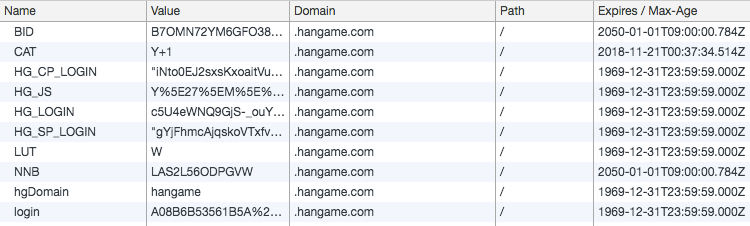
2. 개인화 (검색 결과 설정, 테마 등)
- 사용자에게 컨텐츠를 보여주기 위한 정보를 기억하기 위해 사용될 수 있습니다.
- 예를 들면
구글 검색 결과를 몇 개씩 보여줄 건가,duckduckgo 사이트의 사용자 테마와 같은 설정 등이 있습니다.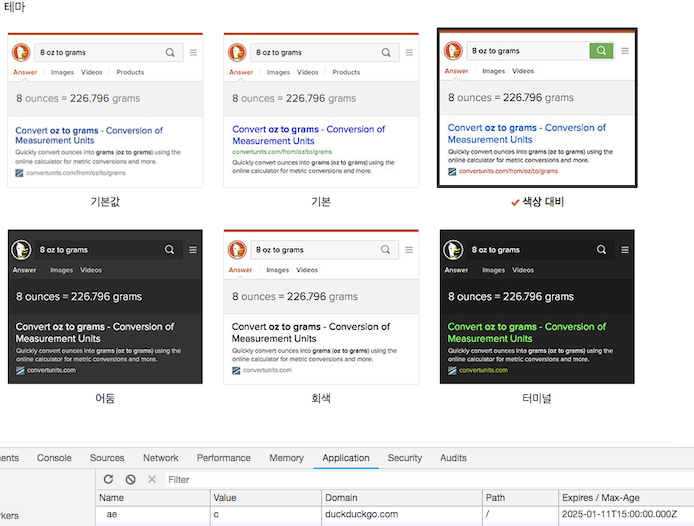
3. 트래킹 (사용자 행동)
- 사용자가 접속했을 때 쿠키가 없으면 사용자가 방문한 첫 페이지라고 추정 후 고유한 식별자를 생성합니다.
- 요청을 보낼 때마다 쿠키가 전송되는 것을 이용해서 요청 시간, 머문 시간 등의 정보를 서버 로그에 저장할 수 있습니다.
쿠키 만드는 방법
1. 유저가 서버에 페이지를 요청합니다.
GET /test HTTP/1.1
Host: localhost:8080
Cache-Control: max-age=0
Upgrade-Insecure-Requests: 1
User-Agent: Mozilla/5.0 (Macintosh; Intel Mac OS X 10_14_0) AppleWebKit/537.36 (KHTML, like Gecko) Chrome/70.0.3538.102 Safari/537.36
DNT: 1
Accept: text/html,application/xhtml+xml,application/xml;q=0.9,image/webp,image/apng,*/*;q=0.8
Accept-Encoding: gzip, deflate, br
Accept-Language: ko,en-US;q=0.9,en;q=0.8
2. 서버에서 응답과 함께 Set-Cookie 헤더를 전송합니다.
HTTP/1.1 200 OK
Server: Apache-Coyote/1.1
Set-Cookie: CookieName1=Example1; Expires=Tue, 27-Nov-2018 02:53:13 GMT
Set-Cookie: CookieName2=Example2; Expires=Tue, 27-Nov-2018 02:53:13 GMT
Set-Cookie: JSESSIONID=8EB8434C5776358C84017077E11A3300; Path=/
Content-Type: text/html;charset=ISO-8859-1
Content-Language: ko
Content-Length: 316
- Set-Cookie는 여러 개도 전송이 가능합니다.
- 헤더에서는 간단한 name : value 형태로 설정 가능합니다.
3. 유저 에이전트가 Set-Cookie 헤더에서 전달된 값을 가지고 쿠키를 생성해서 저장합니다.

4. 이렇게 생성된 쿠키는 클라이언트가 서버에 요청할 때마다 브라우저가 같이 전송해줍니다.
GET /test HTTP/1.1
Host: localhost:8080
Cache-Control: max-age=0
Upgrade-Insecure-Requests: 1
User-Agent: Mozilla/5.0 (Macintosh; Intel Mac OS X 10_14_0) AppleWebKit/537.36 (KHTML, like Gecko) Chrome/70.0.3538.102 Safari/537.36
DNT: 1
Accept: text/html,application/xhtml+xml,application/xml;q=0.9,image/webp,image/apng,*/*;q=0.8
Accept-Encoding: gzip, deflate, br
Accept-Language: ko,en-US;q=0.9,en;q=0.8
Cookie: JSESSIONID=8EB8434C5776358C84017077E11A3300; CookieName1=Example1; CookieName2=Example2
쿠키의 속성
1. Domain
- Domain은 쿠키의 스코프를 정의하며 쿠키가 어느 웹사이트에서 만든 것인지 알려줍니다.
- 또한 보안상의 이유로 현재 리소스의 최상위 도메인과 하위 도메인만 설정 가능합니다.
- EX) hangame.com은 payco.com 도메인을 가진 쿠키를 생성할 수 없습니다.
- 서버에서 정해주지 않는다면 쿠키가 생성될 때의 요청 도메인으로 설정됩니다.
- Domain이 있는 것과 없는 것도 차이가 존재합니다.
- hangame.com에서 쿠키를 만들때 Domain 값을 지정하지 않은 경우
- hangame.com에서만 쿠키가 전송이 됩니다.
- hangame.com에서 쿠키를 만들때 Domain 값을 hangame.com으로 지정한 경우
- accounts.hangame.com같은 서브도메인에서도 전송이 됩니다.
- hangame.com에서 쿠키를 만들때 Domain 값을 지정하지 않은 경우
2. Path
- Domain과 마찬가지로 쿠키의 스코프를 정의하며 쿠키가 웹사이트의 어느 경로에서 사용하는 것인지 알려줍니다.
- Path가 설정된 경우 Path가 일치하는 경우에만 쿠키를 전송합니다.
- Path를 명시하지 않으면 Set-Cookie 헤더를 전송한 서버의 경로를 사용합니다.
3. Expires / Max-Age
- Expire와 Max-Age는 쿠키의 유효 시간을 나타내는 속성입니다.
- Expire는 날짜를 지정하며 만료 시간이 지나면 브라우저가 삭제합니다.
- Max-Age는 유효 시간을 지정하며 쿠키를 받은 시간으로부터 계산하며 만료된 경우 브라우저가 삭제합니다.
4. Secure
- Secure는 쿠키의 범위를 보안 채널로 제한하는 속성입니다.
- 유저 에이전트가 요청이 암호화된 연결인 경우에만 쿠키를 보냅니다.
5. HttpOnly
- HttpOnly는 쿠키의 범위를 HTTP요청으로 제한합니다.
- HttpOnly가 설정된 경우 클라이언트 사이드 API로는 쿠키에 접근하지 못합니다.
쿠키의 종류
세션 쿠키
- 세션 쿠키는 클라이언트가 종료되면 삭제되는 쿠키입니다.
- Expires나 Max-Age를 명시하지 않으면 클라이언트가 종료될 때 삭제되는 세션 쿠키가 생성됩니다.
- 반대로 얘기하면 Expires나 Max-Age를 명시하게 되면 명시된 시간까지 계속 유지 가능한 쿠키가 생성됩니다.
시큐어 쿠키
- 시큐어 쿠키는 암호화된 연결(HTTPS)로만 전송할 수 있습니다.
- secure 플래그를 추가해서 생성하며 HTTPS로 전송하기 때문에 쿠키를 열어보는 걸 방지할 수 있습니다.
Http-only 쿠키
- 자바스크립트 같은 클라이언트 사이드 API를 통해 접속할 수 없는 쿠키이며 XSS 위협을 없애줍니다.
- 하지만 여전히 cross-site tracing (XST) 와 cross-site request forgery (XSRF) 공격에 공격받기 쉽습니다.
- HttpOnly 플래그를 쿠키에 추가하여 생성합니다.
Same-site 쿠키
- 구글 크롬 버전 51에서 새로 소개된 쿠키입니다.
- 쿠키를 생성한 도메인과 같은 출처일 때만 쿠키를 전송합니다.
third-party 쿠키
- 현재 방문하고 있는 사이트가 아닌 다른 사이트의 쿠키입니다.
- 광고와 같은 외부 웹사이트의 컨텐츠가 있을 때 생성되며 이 쿠키를 이용해 사용자를 추적하여 광고를 제공하는 데 사용합니다.
좀비 쿠키
- 지워져도 자동으로 생성되는 쿠키입니다.
- 쿠키 컨텐츠를 플래시 쿠키, HTML5 웹 저장소, 클라이언트 등에 저장하였다가 쿠키가 없으면 다시 쿠키를 생성합니다.
쿠키의 버전별 차이
쿠키 버전 0, 1의 차이
-
쿠키 버전 0은 Netscape 쿠키를 쿠키 버전 1은 RFC 2109 쿠키를 뜻합니다.
-
RFC 2109는 기존 Netscape 쿠키의 스펙을 체계적으로 정리하고 수정하려고 시도한 것입니다.[3]
-
쿠키 버전 별 속성 차이
- Netscape 쿠키 속성은 쿠키 Name, Value,
Expires, Domain, Path, Secure, 가 있습니다. - RFC 2109의 쿠키 속성은 쿠키 Name, Value,
Comment, Domain,Max-Age, Path, Secure,Version이 있습니다.
- Netscape 쿠키 속성은 쿠키 Name, Value,
-
쿠키 버전 별 차이점
- Netscape는 고정된 길이를 가진 날짯값으로 유효 기간을 나타내는 Expires를 사용하고 RFC 2109 쿠키는 delta-seconds를 사용합니다.
- Netscape의 날짜 값에는 공백이 들어갑니다.
- Netscape 쿠키는
;,' '만 허용하지 않았으나 RFC 2109는 더 많고 다양한 특수 문자가 허용되지 않습니다. - Netscape 쿠키는 속성-값 쌍에서 "로 싸여 있는 문자열을 허용하지 않지만, RFC 2109 쿠키는 허용합니다.
- Netscape 쿠키는
속성=값에서 = 주변에 공백을 허용하지 않지만, RFC 2109 쿠키는 허용합니다.
RFC 6265, RFC 2109의 쿠키 차이.
- RFC 2109는 제일 처음 쿠키의 개념과 문법에 관해서만 설명했지만, RFC 6265는 인터넷상에서 실제로 어떻게 구현해서 사용해야 하는지를 설명했습니다.
- RFC 6265가 나오면서 RFC 2109와 RFC 2965는 폐기되었습니다.[4]
- 둘 다 Set-Cookie 헤더를 이용합니다.
- RFC 2109의 쿠키 속성은 쿠키 Name, Value,
Comment, Domain, Max-Age, Path, Secure,Version이 있습니다. - RFC 6265의 쿠키 속성은 쿠키 Name, Value,
Expires, Domain, Max-Age, Path, Secure,HttpOnly가 있습니다. - Comment는 서버가 쿠키의 용도를 기록해두기 위한 속성, Version은 쿠키가 어떤 명세서를 따르는지 버전을 나타냅니다.
- Expires는 Date 값을 가지고 있으며 이 날짜가 지나면 쿠키를 버리고, HttpOnly는 비HTTP 요청을 막습니다. (클라이언트가 API로 접근하는 행위 등)
- 구현 시 고려 사항에 관한 점 또한 변경되었습니다.
- RFC 2109는 유저 에이전트가 최소
300개의 쿠키, 쿠키마다 적어도 4096바이트,한 호스트나 도메인마다 최소20개를 지원해야 한다고 명시했습니다.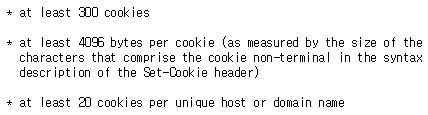
- RFC 6265는 유저 에이전트가 최소
3000개의 쿠키, 쿠키마다 적어도 4096바이트,도메인당최소50개의 쿠키를 저장 가능해야 한다고 명시했습니다.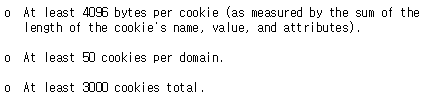
- 또한 RFC 6265는 속성이름과 세미콜론 사이에 공백이 필요하고 특수 문자가 있는 경우를 제외하면 속성 값을 ""로 감싸지 않습니다.
- RFC 6265는 유저 에이전트가 Set-Cookie 헤더를 어떻게 처리해야 하는지 알고리즘을 제공합니다.
- RFC 2109는 유저 에이전트가 최소
- javax.servlet.http.Cookie
- 최신버전은 기본적으로 6265를 사용합니다.
* This class supports both the RFC 2109 and the RFC 6265 specifications.
* By default, cookies are created using RFC 6265.
- setVersion으로 netscape, 2109 설정 가능합니다.
/**
* Sets the version of the cookie protocol this cookie complies with.
* Version 0 complies with the original Netscape cookie specification.
* Version 1 complies with RFC 2109.
* <p>
* Since RFC 2109 is still somewhat new, consider version 1 as experimental;
* do not use it yet on production sites.
*
* @param v
*            0 if the cookie should comply with the original Netscape
*            specification; 1 if the cookie should comply with RFC 2109
* @see #getVersion
*/
public void setVersion(int v) {
        version = v;
    }
- default 버전의 쿠키를 가져오면 0 (netscape)가 가져와 집니다.
- RFC 문서에는 6265에는 Expires가 생겼다고 적혀있으나 maxAge만 있습니다.
private final String name;
private String value;

private int version = 0; // ;Version=1 ... means RFC 2109 style

//
// Attributes encoded in the header's cookie fields.
//
private String comment; // ;Comment=VALUE ... describes cookie's use
private String domain; // ;Domain=VALUE ... domain that sees cookie
private int maxAge = -1; // ;Max-Age=VALUE ... cookies auto-expire
private String path; // ;Path=VALUE ... URLs that see the cookie
private boolean secure; // ;Secure ... e.g. use SSL
private boolean httpOnly; // Not in cookie specs, but supported by browsers
- maxAge를 정하면 자동으로 Expires가 정해집니다.
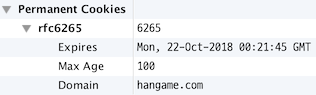
톰캣 6.0~8.5 버전별 쿠키 이슈.
톰캣 6.0
1. DIGEST 인증이 6.0.x Manager App에서 WWW-Authenticate 헤더 중복문제로 깨지는 경우
-
재현 방법
- 401에러 페이지 방문합니다.
    HTTP/1.1 401 Unauthorized
    Pragma: No-cache
    Cache-Control: no-cache
    Expires: Thu, 01 Jan 1970 10:00:00 EST
    WWW-Authenticate: Basic realm="Tomcat Manager Application"
    Set-Cookie: JSESSIONID=****removed****; Path=/manager
    WWW-AuthenticateREDUNDANT: Basic realm="Tomcat Manager Application"
    Content-Type: text/html
    Transfer-Encoding: chunked
    Vary: Accept-Encoding
    Date: Mon, 26 Mar 2012 03:39:09 GMT
    Server: Coyote
* 해결 방법
1. 6.0.36으로 업데이트합니다.
2. 401.jsp에서 해당 라인을 삭제합니다. (상황에 따라 다를 수 있으므로 확인이 필요합니다.)
3. 만약 헤더가 설정돼있는지 확인하고 없는 경우에만 추가합니다.
### 2. [쿠키 값을 ""로 묶을 때 헤더 값이 손상되는 현상](https://bz.apache.org/bugzilla/show_bug.cgi?id=57896)
* 재현 방법
1. 스크린샷같이 쿠키를 생성합니다.
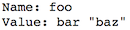
2. 페이지를 재방문하면 헤더 값이 손상됩니다.
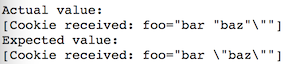
* 해결 방법
1. 6.0.45로 업데이트합니다.
## 톰캣 7.0
[7.0 전체 버그 리스트](https://bz.apache.org/bugzilla/buglist.cgi?bug_status=__all__&content=cookie&no_redirect=1&order=bug_id&product=Tomcat%207&query_format=specific)
### 1. [의도하지 않게 JSESSIONID가 수정되는 현상](https://bz.apache.org/bugzilla/show_bug.cgi?id=60854)
* 재현 방법
1. 사용자가 요청을 보내서 유저 인증과 동시에 세션을 만듭니다.
2. JSESSIONID 쿠키가 반환됩니다.
3. 클라이언트가 쿠키를 2번째 요청과 같이 보내면 새로운 JSESSIONID 쿠키가 생성됩니다.
* 해결 방법
1. alwaysUseSession="true"로 설정합니다. (사용자가 옵션으로 선택 가능하게 수정하지 않았음)
### 2. [톰캣 시작시 ClusterSingleSignOn valve의 SingleSignOnEntry 캐시가 동기화되지 않는 현상](https://bz.apache.org/bugzilla/show_bug.cgi?id=57338)
* 해결 방법
1. 7.0.62로 업데이트합니다.
## 톰캣 8.0 ~ 8.5
[8.0 ~ 8.5 전체 버그 리스트](https://bz.apache.org/bugzilla/buglist.cgi?bug_status=__all__&content=cookie&no_redirect=1&order=bug_id&product=Tomcat%208&query_format=specific)
### 1. Domain 속성이 .으로 시작하면 에러가 발생하는 현상
* 재현방법
1. domain의 속성을 .으로 시작하게 쿠키를 생성합니다.

* 해결 방법
1. Domain 앞에 .을 제거합니다.
2. 기존 LegacyCookieProcessor를 사용하도록 context.xml 수정합니다.
### 2. [Request.parseCookies\(\)에서 NullPointerException이 발생하는 현상](https://bz.apache.org/bugzilla/show_bug.cgi?id=58578)
* 해결 방법
1. 8.0.29로 업데이트합니다.
### 3. [Rfc6265CookieProcessor에서 유효한 도메인 문자가 불완전한 현상](https://bz.apache.org/bugzilla/show_bug.cgi?id=58445)
* 해결 방법
1. 8.0.27로 업데이트합니다.
### 4. [잘못된 쿠키가 들어온 경우 Rfc6265CookieProcessor가 모든 쿠키를 무시하는 현상](https://bz.apache.org/bugzilla/show_bug.cgi?id=60627)
* 해결 방법
1. 8.5.12로 업데이트합니다.
2. version이 0일 때도 RFC6265로 파싱할 수 있도록 합니다.
### 5. [Set-Cookie 헤더가 RFC 스펙과 다름](https://bz.apache.org/bugzilla/show_bug.cgi?id=60876)
* 해결 방법
1. 8.5.13으로 업데이트합니다.
## 모든 버전에서 발생
### 1. 쿠키에 한글을 저장할 때 에러가 나는 현상
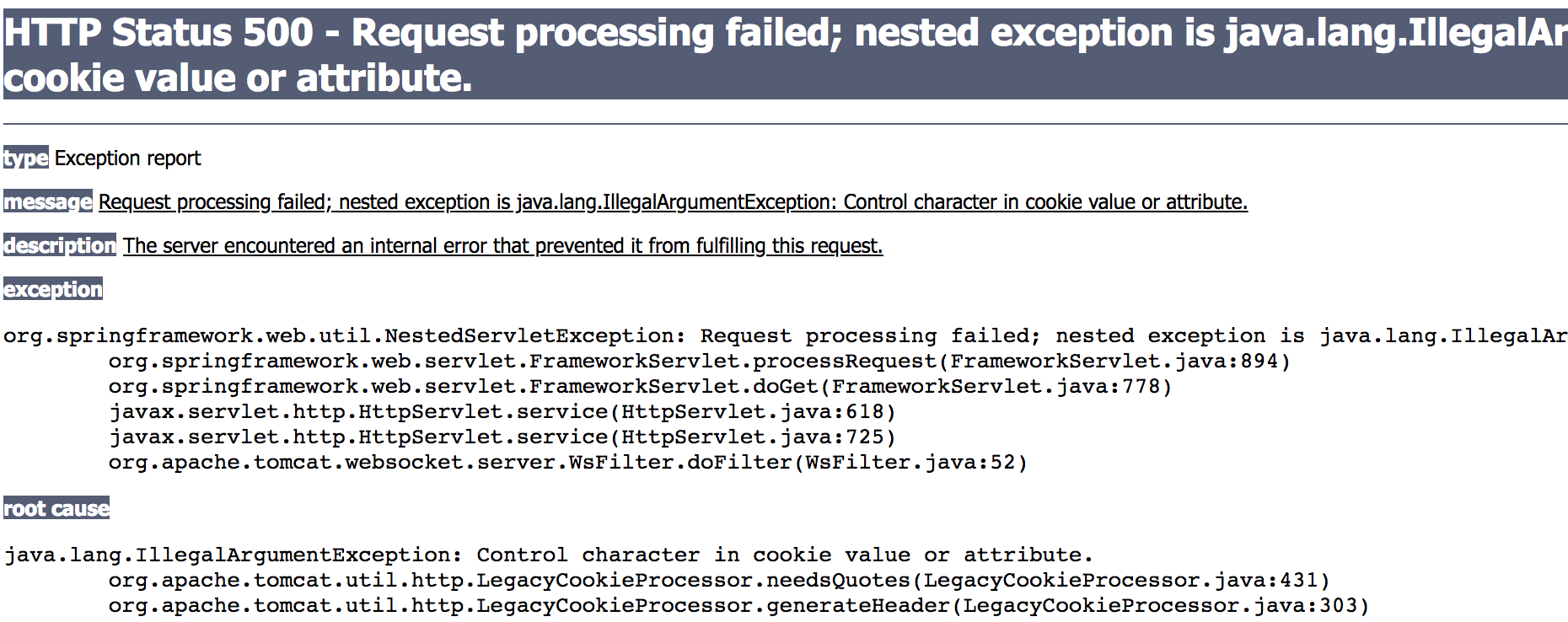
* 해결 방법
1. URLEncoder.encode를 사용하여 저장합니다.

2. Tomcat 버전 8.5는 자동으로 처리됩니다.

### 2. 쿠키값에 =가 들어 있으면 =뒤의 문자가 잘리는 현상

* 재현 방법
1. 클라이언트 쪽에서 `=`가 들어간 값을 `""`로 감싸지 않고 보낼 경우 발생합니다.
2. `org.apache.catalina.STRICT_SERVLET_COMPLIANCE=true`로 설정이 돼 있어서 `=`가 들어간 쿠키 값을 `""`로 감싸지 않을 경우 발생합니다.
* 해결 방법
1. catalina.properties에 `org.apache.tomcat.util.http.ServerCookie.ALLOW_EQUALS_IN_VALUE=true`를 추가합니다.

2. URLEncoder.encode를 사용하여 저장합니다. (값을 읽을 때 Decoding 필요합니다.)

3. value에 =가 들어가는 값은 원칙대로면 유효하지 않은 값이라 ""안에 있어야 합니다.
### 3. 쿠키값에 @가 들어 있으면 @뒤의 문자가 잘리는 현상

* 재현 방법
1. 클라이언트 쪽에서 `@`가 들어간 값을 ""로 감싸지 않고 보낼 경우 발생합니다.
2. `org.apache.catalina.STRICT_SERVLET_COMPLIANCE=true` 로 설정이 돼 있어서 `@`가 들어간 쿠키 값을 ""로 감싸지 않을 경우 발생합니다.
* 해결 방법
1. catalina.properties에 `org.apache.tomcat.util.http.ServerCookie.ALLOW_HTTP_SEPARATORS_IN_V0=true`를 추가합니다.
* 버전 8.5

* 버전 7

* 버전 6 (<span style="color:#e11d21">해결 불가능</span>) 설정값이 버전7 부터 존재합니다.
2. URLEncoder.encode를 사용하여 저장합니다. (값을 읽을 때 Decoding이 필요합니다.)

3. value에 `@`가 들어가는 값은 원칙대로면 유효하지 않은 값이라 ""안에 있어야 합니다.
### 4. 쿠키 Value에 +가 들어있을 때 " "(공백)으로 바뀌는 현상
* 재현 방법
1. 쿠키를 전송할 때 Content-type 이 applicatoin/x-www-form-urlencoded 일 때 발생합니다.
* 해결 방법
1. Url-safe base64 encode를 사용합니다. (Encoding을 하면 `+`와 `/`가 `-`랑`_`로 변경됩니다.)
```java
/**
* This array is a lookup table that translates 6-bit positive integer
* index values into their "Base64 Alphabet" equivalents as specified
* in "Table 1: The Base64 Alphabet" of RFC 2045 (and RFC 4648).
*/
private static final char[] toBase64 = {
'A', 'B', 'C', 'D', 'E', 'F', 'G', 'H', 'I', 'J', 'K', 'L', 'M',
'N', 'O', 'P', 'Q', 'R', 'S', 'T', 'U', 'V', 'W', 'X', 'Y', 'Z',
'a', 'b', 'c', 'd', 'e', 'f', 'g', 'h', 'i', 'j', 'k', 'l', 'm',
'n', 'o', 'p', 'q', 'r', 's', 't', 'u', 'v', 'w', 'x', 'y', 'z',
'0', '1', '2', '3', '4', '5', '6', '7', '8', '9', '+', '/'
};
/**
* It's the lookup table for "URL and Filename safe Base64" as specified
* in Table 2 of the RFC 4648, with the '+' and '/' changed to '-' and
* '_'. This table is used when BASE64_URL is specified.
*/
private static final char[] toBase64URL = {
'A', 'B', 'C', 'D', 'E', 'F', 'G', 'H', 'I', 'J', 'K', 'L', 'M',
'N', 'O', 'P', 'Q', 'R', 'S', 'T', 'U', 'V', 'W', 'X', 'Y', 'Z',
'a', 'b', 'c', 'd', 'e', 'f', 'g', 'h', 'i', 'j', 'k', 'l', 'm',
'n', 'o', 'p', 'q', 'r', 's', 't', 'u', 'v', 'w', 'x', 'y', 'z',
'0', '1', '2', '3', '4', '5', '6', '7', '8', '9', '-', '_'
};
- Java 8 에서는
java.util.Base64에서getUrlEncoder().encode메소드를 사용합니다. - 8이하 버전에서는
org.apache.commons.codec.binary.Base64에서encodeBase64URLSafeString메소드를 사용합니다.
5. 쿠키 이름에 괄호가 들어가는 경우 에러가 발생하는 현상
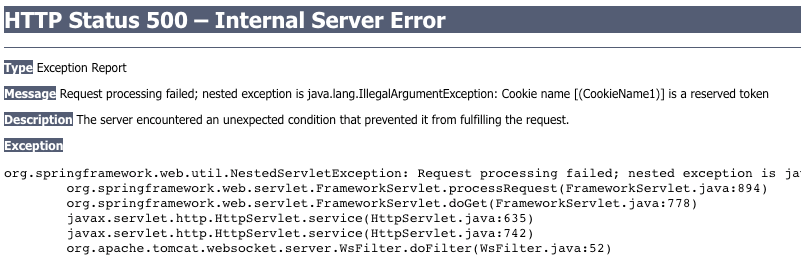
- 재현 방법
- 쿠키 이름에 괄호를 집어넣어 생성합니다.
- Tomcat 6
-
이름에 괄호가 들어간 경우 value가 공백으로 들어옵니다.
-
value에 값이 들어간 경우에는 읽지 못합니다.
makeCookie(response, "(CookieName1)", "Bracket");
makeCookie(response, "{CookieName2}", "Bracket");
makeCookie(response, "[CookieName3]", "Bracket");
makeCookie(response, "CookieName4", "(Bracket)");
makeCookie(response, "CookieName5", "{Bracket}");
makeCookie(response, "CookieName6", "[Bracket]");
↓ 결과

-
- Tomcat 7 이상
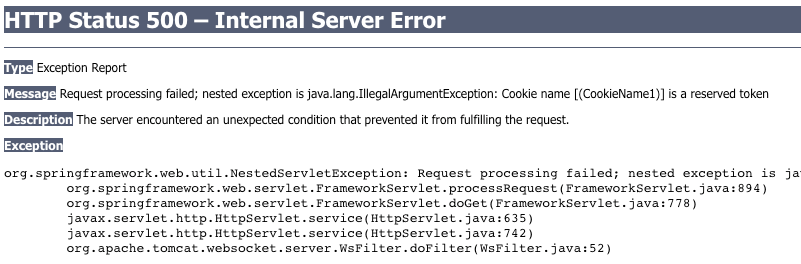
- Tomcat 6
- 쿠키 이름에 괄호를 집어넣어 생성합니다.
- 해결 방법
- URLEncoder.encode를 사용하여 저장합니다. (값을 읽을 때 Decoding이 필요합니다.)

- URLEncoder.encode를 사용하여 저장합니다. (값을 읽을 때 Decoding이 필요합니다.)
출처
[1]https://en.wikipedia.org/wiki/HTTP_cookie#History [2]http://web.archive.org/web/20020803110822/http://wp.netscape.com/newsref/std/cookie_spec.html [3]https://tools.ietf.org/html/rfc2109 [4]https://tools.ietf.org/html/rfc6265